Tautology is a common trap in writing. It’s not about poor vocabulary, it often happens when you’re tired, burned out, or reworking the same content for different formats. Your brain just defaults to familiar phrases. You try to say something in a new way … but keep circling back to the same words.
So you end up with stuff like:
An important event that played an important role in an important part, blah-blah-blah …
Doesn’t look very pretty, right?🫤
Thankfully, there are thesauruses, collections of synonyms that make finding the right word easier. Today, they’re more than dusty, thick books filled with words. Modern thesauruses come in many forms: from interactive synonym lists to AI-powered tools. They’ve also become an essential part of digital spell-checkers. Instead of jumping between apps or searching for synonyms manually, you can have everything right at your fingertips while you write ☺️
Today, we want to show you how a built-in thesaurus in modern text-checking tools can completely change the way you work with text.
Types of thesauruses: from classic lists to AI-based tools
Okay, so you’re sold on the idea of a thesaurus saving your text from repetitive words. Back in the day, that meant flipping through a chunky, old-school book, hunting for synonyms in tiny print. Think dusty library vibes and Roget’s thesaurus from the 1800s.
Nowadays, different thesauruses live in digital tools, packed with all kinds of features:
- antonym suggestions
- full-sentence paraphrasing
- context-based tone adjustment
- semantic relationship mapping
- multilingual synonym suggestions
- collocation suggestions
- frequency-based suggestions
- visual word mapping
- domain-specific terminology
To make it easier, we’ve summarized the main categories, their key features, and the pros and cons in a simple table. This way, you can quickly see which type fits your workflow.
| Type of thesaurus | Key features | Pros | Cons |
| Classic online thesaurus (Cambridge Thesaurus, Thesaurus.com) | – lists synonyms and some antonyms – example phrases | – quick lookup – easy to use | – minimal context awareness – “word dump” effect – standalone website |
| AI-based Thesaurus (GPTionary, ClassX) | – context-aware suggestions – lists synonyms and antonyms – example phrases | – smart & fast suggestions; – it could give advice to adapt to your style. | – sometimes suggestions feel off if the context is complex. – inconsistent at times – may require a learning curve – standalone website |
| Translation-integrated thesaurus (DeepL translator) | – hover-over synonym suggestions while translating | – convenient for multilingual work – maintains sentence context | – limited to translation workflow – not a dedicated thesaurus – gives inaccurate replacement |
AI Chatbots (ChatGPT) | – lists synonyms and antonyms – full sentence rephrasing – style adaptation | – highly flexible – can generate varied options | – inconsistent results – not always consistent – needs clear prompting |
Regardless of which type of tool you choose, a thesaurus is your ticket to ditching repetition and keeping your writing sharp. However, each tool has its strengths and weaknesses, but the real drawback is having to pause your work, switch tabs, and hunt for synonyms—a process that completely breaks your writing flow.
That’s why having a thesaurus built right into your text-checking tool can be a game-changer.
These tools build thesaurus features right into the core experience. They check your grammar and spelling as you type and instantly suggest better word choices. Instead of opening another site, you just highlight the word, like ‘important’ and the tool offers ‘crucial,’ ‘vital,’ or ‘pivotal’ right there. The suggestions appear in a sidebar or a right-click menu, so you can polish your text without ever leaving it.
Besides that, you get a bunch of other perks from these tools:
- context-aware suggestions
- tone tuning. Adjusting word choice to match your audience
- providing definitions for words suggested for replacement
Let’s take a look at how this all works in practice.
Built-in thesaurus in digital spellchecker
Built-in thesaurus features in spellcheckers often rely on integrated APIs. For example, there’s the Cambridge Dictionary API or the Collins Dictionary API. But the main issue is that most of them support only one language, usually English. So, when choosing a spellchecker, you should also check which languages it supports.
We’re going to see how a few popular grammar checkers extensions handle spotting and fixing tautologies. For this test, we’ll stick to tools that work in English to cover the widest range of spellcheckers. We’ll also use only the free versions, so we can see whether an average user can get decent results without spending a dime.
Let’s take this sentence as our test case:
Hey Arthur,
We had a quick team meeting today about data security. We went over the new functions in our tools and talked about which data security features could be more useful. We also chatted about ways to make our team better at keeping data safe.
In our example, the words we want to swap out are the repeating ones that make the sentence feel stuck. Swapping them with fresh alternatives will make the text smoother and easier to read, without changing the meaning.
Here’s what we’re focusing on:
- ‘security’ → alternatives like ‘information protection’, ‘cybersecurity’
- ‘functions’ → alternatives like ‘features’, ‘capabilities’, ‘aspects’
- ‘team’ → alternatives like ‘group’, ‘crew’, ‘staff’
WProofreader
Over the past months, we’ve noticed a growing number of requests from our existing customers who specifically need a thesaurus feature, an advanced, context-aware synonym finder that works directly within the spellchecker interface. Many of them have emphasized how much easier it would make the daily work of their users by suggesting highly relevant replacements in real time, without having to leave their writing flow.
In response to this demand, the WebSpellChecker team is actively developing this feature to integrate it into WProofreader. We’re carefully designing it to make sure it will be simple and intuitive to use.
Our main goal is to give users accurate and relevant suggestions exactly when they need them. Here’s a first look at how we plan to make finding synonyms easier without leaving your writing process.
Right now, we’re focusing on the core function: delivering the most accurate and context-relevant synonym suggestions in multiple languages. Here’s a sneak peek at how it works in practice at this stage of development.
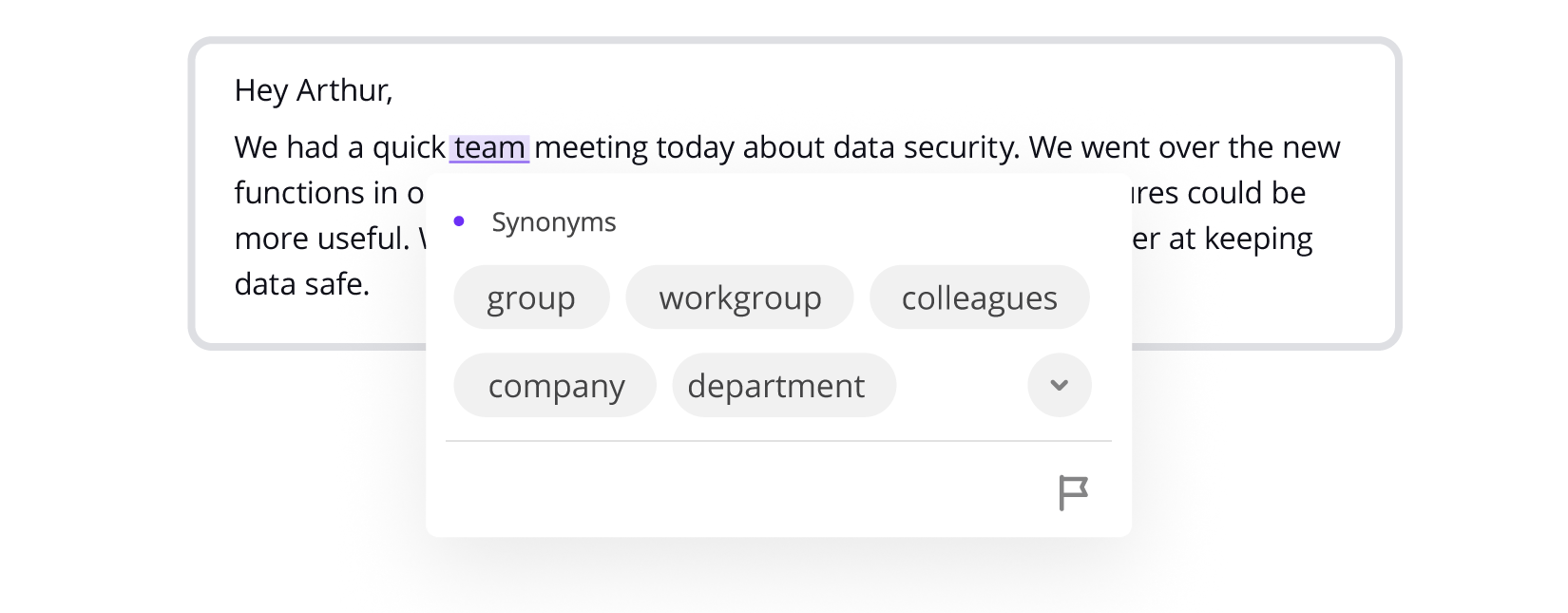
In future updates after the release, we also plan to add the following features:
- the definition of the word you want to replace
- categorized suggestions based on part of speech and context
- antonyms which can help you look at your text from a different angle
Our thesaurus will work in multiple languages, like other WProofreader features.
Also, the built-in thesaurus will be available within the standalone WProofreader product version. Clients will be able to run it on their own servers, so all user text and suggestions stay completely private. This setup also gives the IT team full control over updates and access. So whether your users write confidential reports, business docs, or multilingual content, they can work confidently and efficiently, without having to rely on an external server.
Grammarly
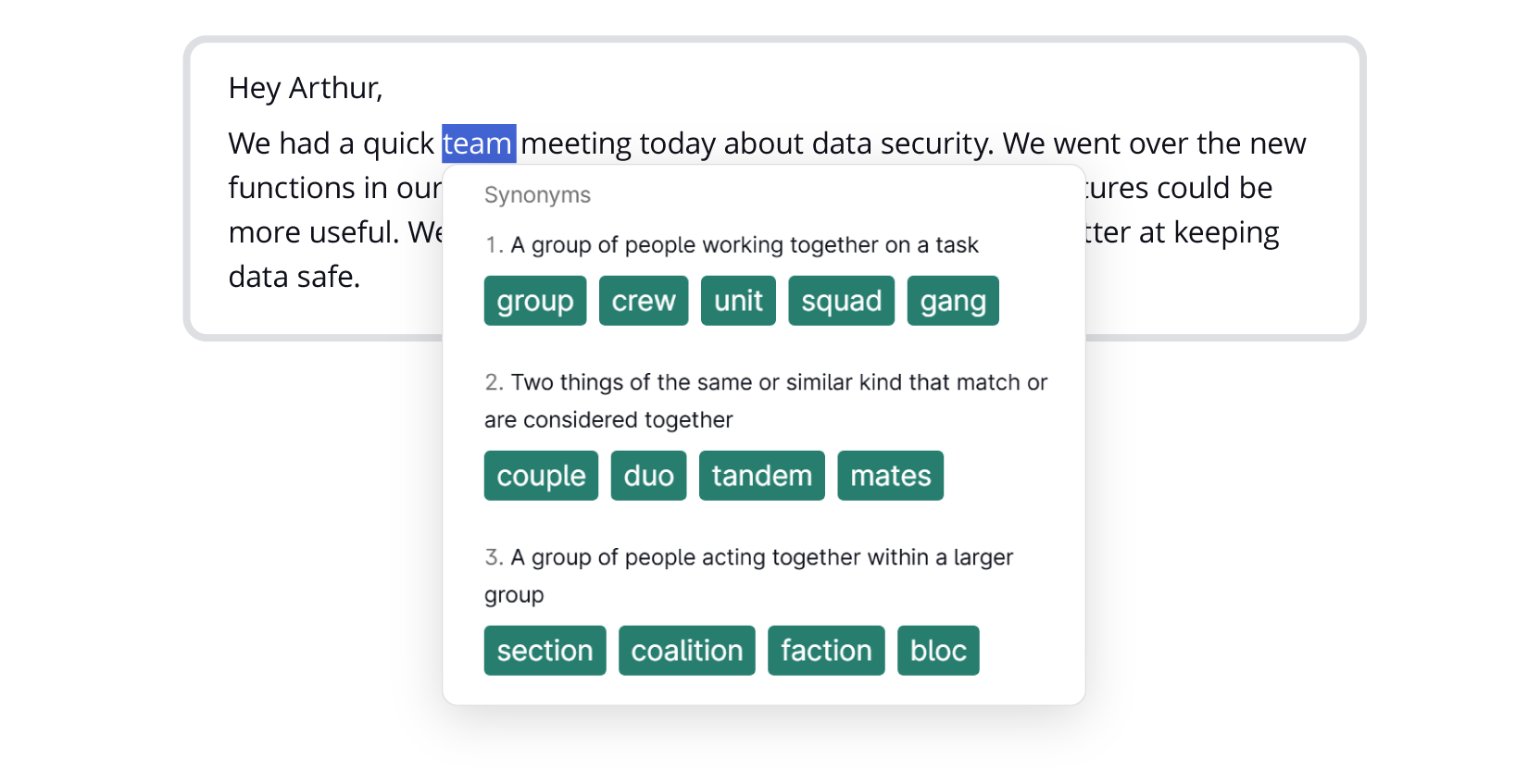
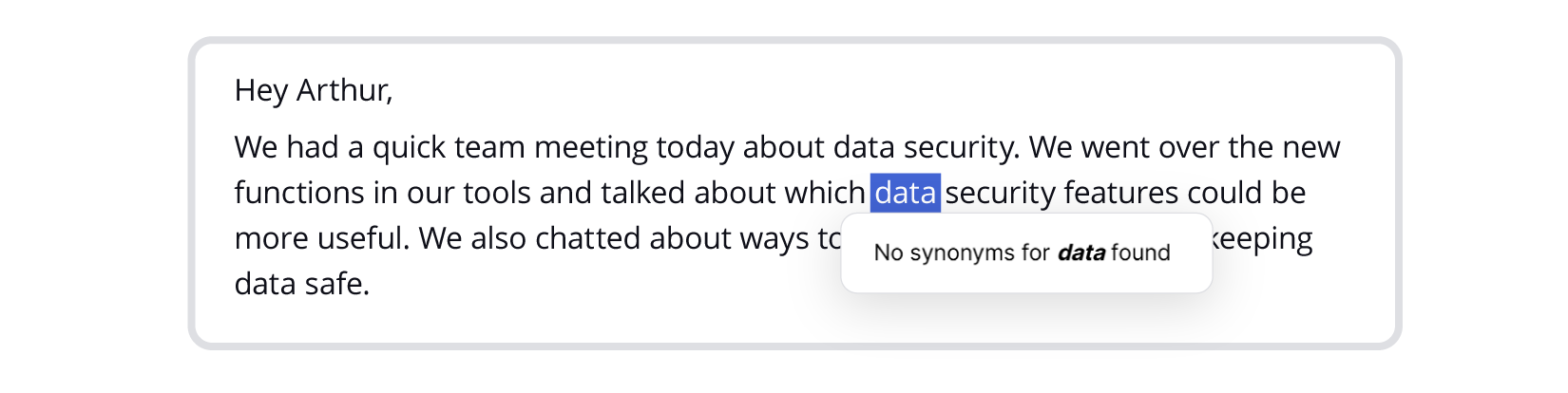
As of September 2025, Grammarly offers synonyms and definitions within its thesaurus option. The suggestions are sorted by context and repeated words in the sentence usually get the same options. Some common words, like ‘data,’ have no suggestions. Also, suggestions are not categorized by part of speech, at least for now and for the free version we tested.
Also, this feature isn’t available on every platform: it doesn’t work in Grammarly for Windows or Mac, Microsoft Office add-ins, or Grammarly for Android. Also, Grammarly is not available as a self-hosted solution.
ProWritingAid
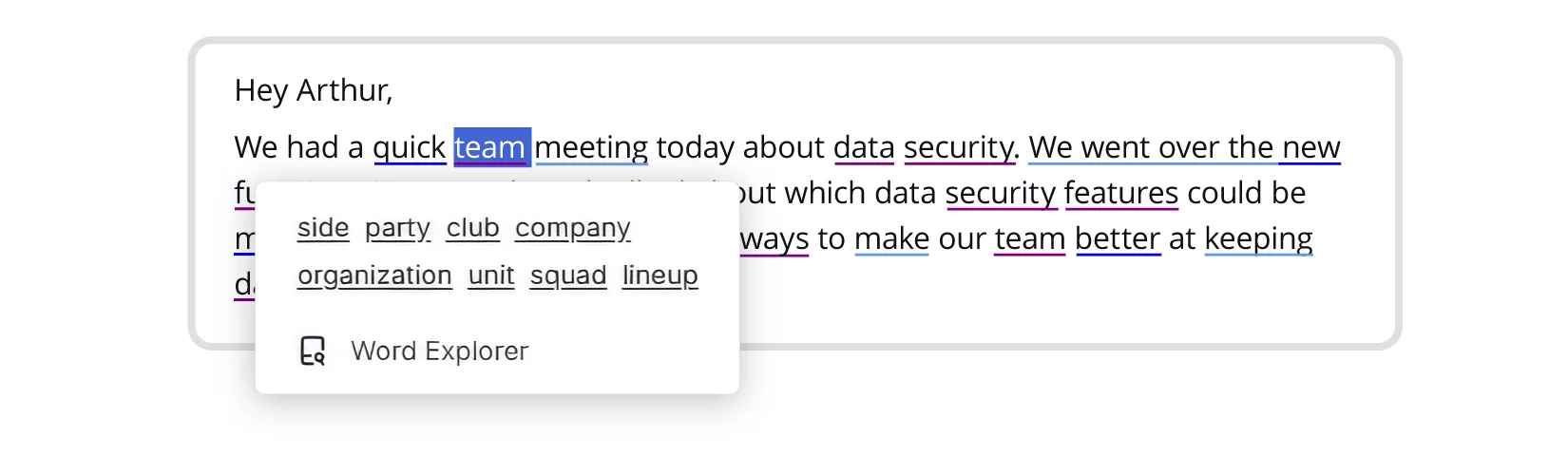
The ProWritingAid shows all the options together. They don’t get sorted into categories, so it’s hard to tell which ones fit best and which ones are weaker choices. The synonyms it suggests aren’t always spot-on for your context.
The tool can show definitions for each word with ‘Word Explorer’, which helps you figure out if it actually works in your sentence. As far as it’s stated on their website, ProWritingAid offers an on-prem option for business clients, but it’s not clear whether thesaurus is available under it.
Linguix
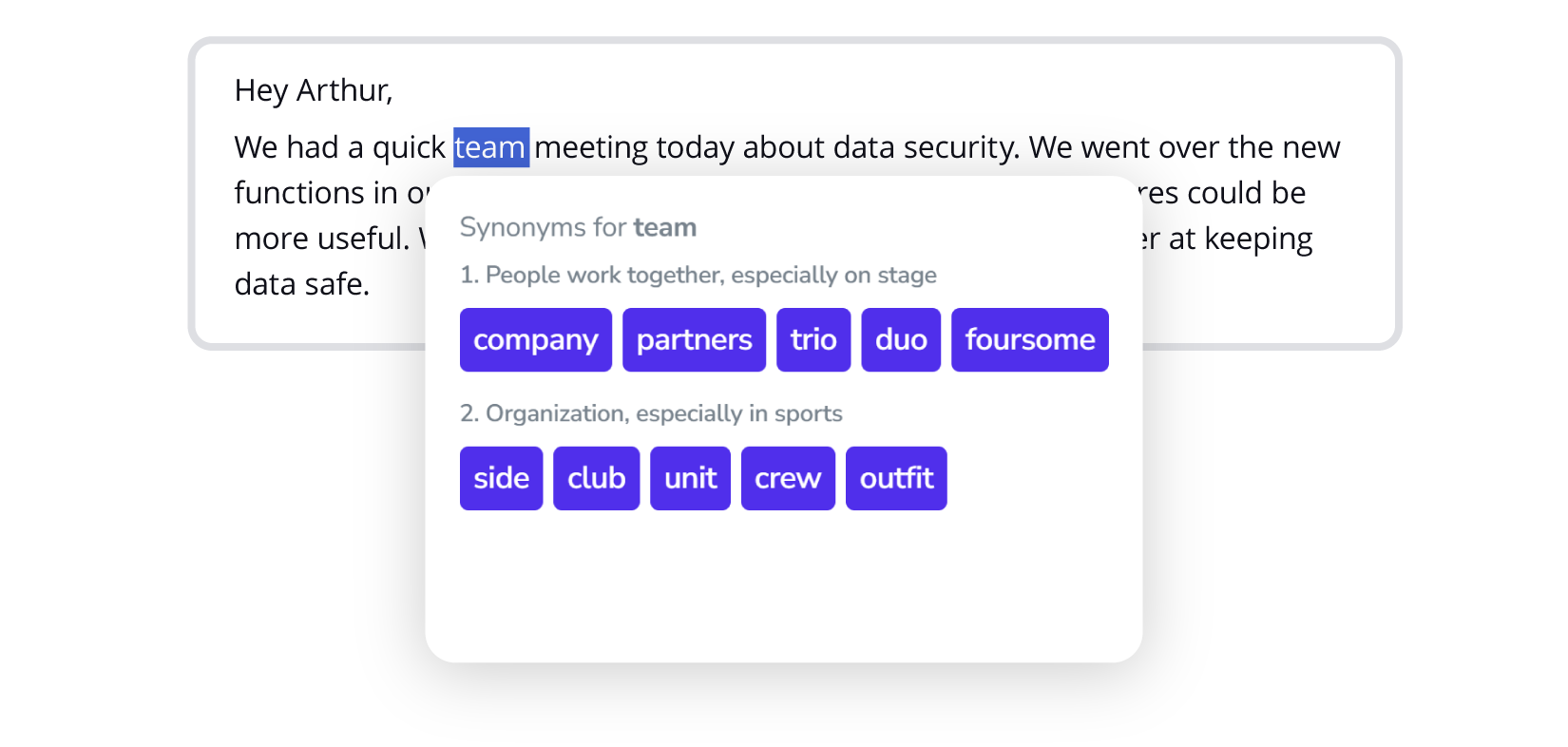
Like Grammarly, Linguix also groups synonyms by their definitions, which helps a bit, but it doesn’t always consider sentence context. Some suggestions felt far from their original meaning.
The definition lookup feature is convenient, but it doesn’t work on all websites, which limits its usefulness at times.
In addition, Linguix has a separate feature on its website, such as a thesaurus in the form of an online dictionary. This is not exactly what we were looking for, but a nice find as well.
Likewise ProWritingAid, Linguix has a standalone product offering with local deployment, but its unknown whether it includes thesaurus or not.
Let’s make a brief conclusion 😉
Each tool we tested has its pros and cons. But there are still clear gaps, like lack of multilingual support in some options, or no local deployment in others. That’s why we’re working on an integrated thesaurus into WProofreader that eliminates these drawbacks and makes writing smoother for everyone. While the feature is still in development, we’ve already tested a variety of APIs and LLM solutions to ensure you’ll get precise synonym suggestions once it’s released.
Our goal is to deliver a multilingual, secure solution packed with all the essential thesaurus features to support your writing process.
However, it’s just a small part of WProofreader’s broader functionality, designed to make working with all kinds of texts noticeably easier.
WProofreader multilingual grammar check solution
WProofreader is a secure and all-in-one digital spellchecker that supports over 20 languages.
You can pick the version that fits your workflow best:
✅ WProofreader browser extension is a great choice for individual users who write documents, emails or other content in multiple languages. It checks spelling and grammar for both individuals and teams. On the free plan, your requests go through our cloud setup. When you decide to upgrade to the Business plan, you’ll be able to deploy it on your own servers.
✅ WProofreader SDK is perfect for developers, small teams and large organizations. It’s a ready-made solution for spell checking in WYSIWYG editors like CKEditor, Froala, TinyMCE, and Quill. You can also get it as a standalone API. Whether you prefer self-hosting (on-prem or in a private cloud) or prefer the cloud deployment option. It’s flexible enough to work with either.
With any version of WProofreader you choose, you will have access to:
- Real-time correction in 20+ languages, including AI-based English, German, and Spanish;
- Autocorrect and autocomplete features;
- Automatic language detection;
- Organization-wide and user custom dictionaries;
- Medical dictionary for English, Spanish, French, and German;
- Legal dictionary for English and its dialects;
- Style check suggestions;
- Style guide builder with customizable rules for your whole team or organization;
- Multifunctional admin panel for managing and configuring WProofreader.
Use WProofreader AI writing assistant 🪄 for your work with texts. It can help you rephrase sentences or even whole sections, keeping the meaning and tone intact, so your writing flows naturally.
This generative AI is built to streamline your writing process: from paraphrasing to content creation. We have carefully crafted and tested a variety of prompt presets tailored to everyday writing needs.
The functions of the AI writing assistant 🪄 are available in the following languages: English, German, Spanish, Portuguese, French, Dutch, Swedish, Italian and Ukrainian.
You can explore WProofreader’s features on our demo site.

WProofreader browser extension
Free for individual users and 14 days-trial for business users.
Explore moreSummary
- Using a thesaurus helps you avoid repeating the same words. You can find the exact words to express your ideas effectively. It makes your writing clearer and easier to read.
- There are many types of thesauruses available: from classic dictionary-style lists to AI-powered tools. The main limitation of most standalone thesauruses is that they exist outside your writing tool.
- So, integrating a thesaurus directly into a grammar and spell-checker is a real game-changer because you can get relevant word suggestions without leaving your text.
- We tested several popular text-checking tools. They really can improve your writing. However, they sometimes provide only a limited selection of synonyms and don’t always take the context of your sentence into account. Also, most of them work only in the language that the spellchecker supports.
- We saw the limitations of other tools and heard requests for a built-in thesaurus, so WProofreader will soon include a thesaurus feature. You will be able to use a multilingual thesaurus, which works locally under on-prem deployment for full privacy. Our upcoming feature roadmap also includes additional functionality, like definitions or a list of antonyms. While the feature is still in development, you can already get a first look at how it will work in practice.
Keep an eye out for the official release ☺️
Want to get the most out of WProofreader? Сontact our team.

 Linguistics
 Deutsch