Slate.js has kept gaining popularity among teams that need a flexible rich text editor for React apps. Unlike traditional WYSIWYG editors, Slate does not come with a ready-to-use editing experience out of the box. It works more like an open source framework for building custom editors, giving developers enough freedom to shape the editor around almost any workflow or product idea.
This flexibility comes at a cost. Slate gives you the core architecture and node model with transforms, but you have to build everything else yourself, including spell and grammar checking.
Native browser spell check in Slate works in a pretty limited way. Attempts to add a full third party grammar checker often run into architectural limitations. As a result, integrations can behave inconsistently, while error highlighting becomes unpredictable.
That is why many teams keep searching for a reliable text checking solution that fits naturally into Slate without relying on constant workarounds or fragile DOM hacks.
Understanding Slate integration capabilities.
Slate originally started as a customizable editor framework for React. That is exactly why common integration approaches work differently here compared to classic WYSIWYG editors.
In RTEs like TinyMCE or CKEditor, many features already exist inside the architecture. Developers get built-in integration points for external plugins. Slate only provides the editor core, state management and a node-based editing system. Teams need to connect everything else separately.
So, text checking integration depends heavily on how a particular spell checker works. Some solutions interact directly with the DOM. Others rely on browser APIs. Some tools render their own highlights on top of the editor. API-based solutions exist too, sending text to an external server for processing.
Below we collected the main integration approaches teams most often use for text checking inside Slate.
| Integration approach | How it works in Slate | Common limitations |
| Browser native spellcheck | Uses built-in browser spell checking | Limited to checking spelling only, without grammar or style suggestions and any additional features |
| Browser extensions | Relies on external extensions | Unstable behavior inside custom editors |
| API | Sends text to external grammar checking service | Requires custom integration logic |
| SDK | Connects editor with dedicated proofreading SDK | Depends on Slate compatibility and implementation quality |
In practice, this often leads to issues. Slate uses custom rendering through React and constantly updates the editor state. Because of that, integrations that work fine in standard content editable editors can lose cursor position, break error highlights, or start lagging.
WProofreader for Slate
WProofreader is an AI-powered toolkit for real-time spelling and grammar correction in 20+ languages.
It works with web-based rich text editors and HTML editable content, helping developers add text checking without rebuilding their editor logic. It also supports secure deployment options, which matters for teams that care about data privacy and control 😉
It comes in two flexible formats that fit different stages of integration:
✅ WProofreader SDK fits teams that build applications with custom editors like Slate or similar React-based RTEs. It lets you embed the tool into an existing editor setup, connect it through an API layer and control how text gets processed. You can run it in the cloud or deploy it on your own infrastructure, depending on security and compliance needs. This approach works best when you want full control inside complex editor architectures without redesigning your whole system.
✅ WProofreader browser extension works better for quick testing or early stage exploration. It runs in the browser and supports web-based editors, including custom Slate implementations. It gives developers a fast way to check how text correction behaves inside real editor environments. Cloud processing handles text checking by default, while business plans unlock additional deployment options for stricter security setups.
No matter which WProofreader version you pick, you’ll benefit from all the features you need for a comprehensive proofreading workflow:
- Real-time multilingual correction, including AI-based English, German, and Spanish;
- Autocomplete feature;
- Automatic language detection;
- Organization-wide and user custom dictionaries;
- Medical dictionary for English, Spanish, French and German;
- Legal dictionary for English and its dialects;
- Style suggestions for non-inclusive language, profanity, dialect variations, anglicisms and other tone issues.
- Style guide builder with customizable rules for your whole team or organization;
- AI writing assistant 🪄 It is a human-trained paraphrasing and content generation tool. We have put significant effort into creating and testing predefined prompts for various text operations. It helps you take your writing even further: rewrite, paraphrase or summarize in just a few clicks. Available in English, German, Spanish, Portuguese, French, Dutch, Swedish, Danish, Norwegian Bokmål and Italian, Polish and Ukrainian—with more tone and style options coming soon!
- The analytics dashboard gives you a clear, readable picture of how WProofreader is used in real workflows. You can see the overall word volume your team processes and how often features like autocorrect step in to help.
You can try out most of these features in our demos.

WProofreader SDK for developers
Available as a cloud or on-premise solution. Try for free.
Explore more
WProofreader connects with Slate and other web-based rich text editors without depending on a specific framework. Teams can use it through the SDK, API setups, or the browser extension depending on their architecture and deployment preferences. All integration approaches support the same core proofreading features, including spelling, grammar,punctuation and style checking.
This makes WProofreader a practical option for adding text checking to custom editor setups where teams do not want to rebuild existing architecture or maintain their own proofreading logic.
Below we show how little setup the SDK requires inside a Slate-based editor, since it is one of the most common integration approaches for development teams.
Integration usually comes down to a few straightforward steps.
1. Package installation
You install the SDK once per project using npm.
npm install @webspellchecker/wproofreader-sdk-js2. Module import
You import WProofreader in the same place where you initialized your Slate editor instance.
import WProofreader from '@webspellchecker/wproofreader-sdk-js';3. Initialization
After your Slate editor renders and the editable DOM element is available, you initialize WProofreader and connect it to that container.
WProofreader.init({
  container: editorEditableElement,
  serviceId: 'YOUR_SERVICE_ID_HERE',
});
The only things you need to set up are:
✅ container—your editor’s editable DOM element
✅ serviceId—your activation key
Try out WProofreader live on Slate on our demo page.
Now it’s time to compare how different spell checkers behave inside Slate and what developers actually get in real projects.
Comparing spell checkers for Slate
Let’s look at a real example of how different solutions behave when you integrate them into a Slate-based editor.
The datas shows interesting results. The principle reason for this is cost of the goods. Anyway, we needed Arthur to help us figure it all out. But He said he will come tomorrow.
In this text, we intentionally introduced errors in several places: datas shows contains incorrect plural usage and subject-verb agreement; principle reason uses the wrong word instead of principal; there are also issues with punctuation and capitalization in He said he will come tomorrow, where both grammar consistency and sentence structure are incorrect.
Grammarly
Grammarly is a well-known spell and grammar checking tool used in web applications and writing platforms. It does not offer an official integration for Slate. To use Grammarly inside Slate-based products, teams usually rely on the browser extension or build a custom integration using its API.
Both approaches work, but they sit outside the editor itself, which can limit control over how text checking behaves inside a complex React-based editor environment.
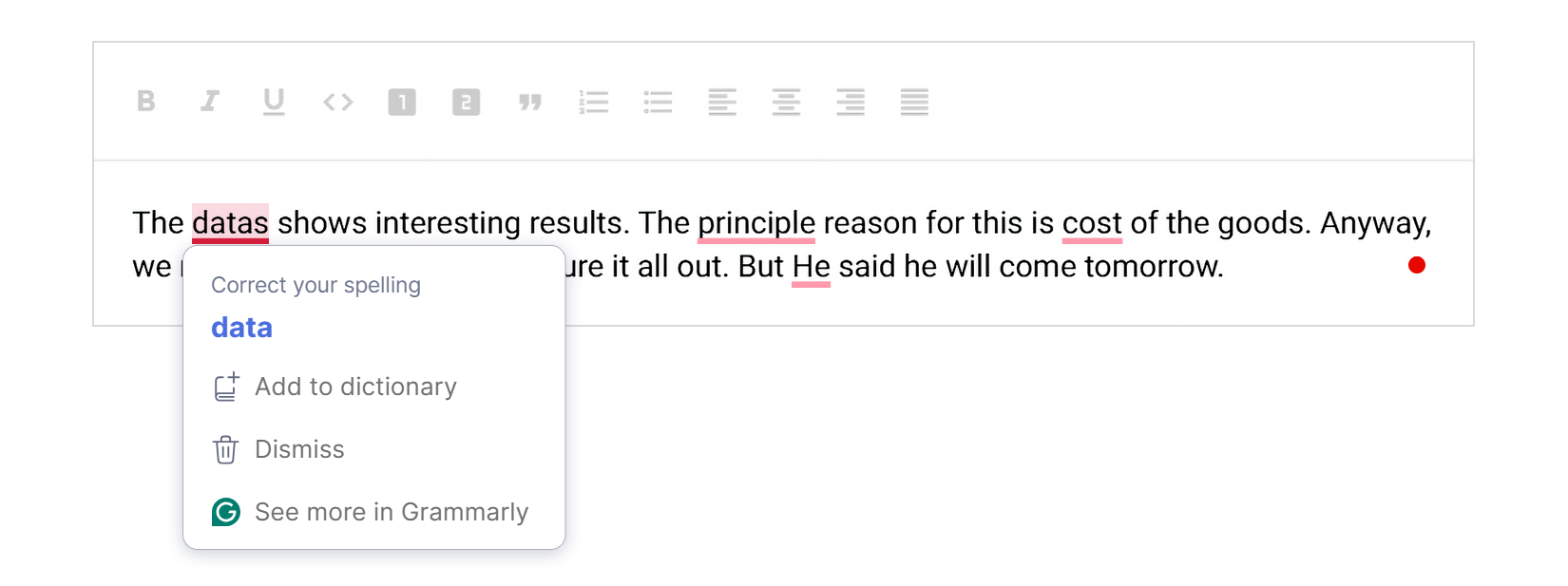
Grammarly only detects four out of six issues in this text. It misses the verb agreement issue in shows and does not catch the error in will come within the reported speech structure.
QuillBot
QuillBot is another proofreading tool that developers sometimes use inside web-based editors through browser extensions. The platform belongs to the same company behind LanguageTool and it started getting much more attention after LanguageTool limited free access to its own browser extension features.
Read our article “Are there free alternatives to LanguageTool?” for more details.
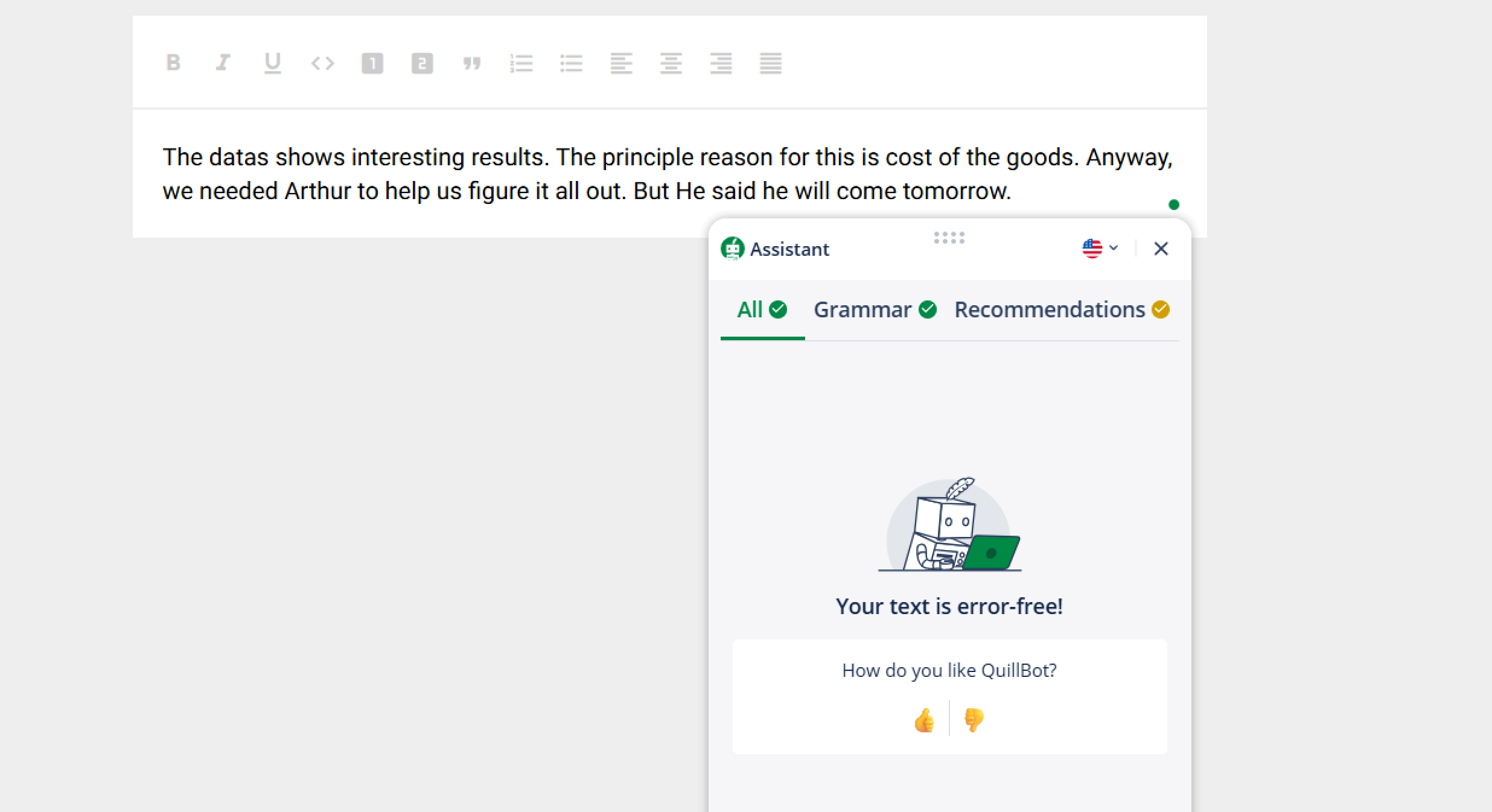
QuillBot did not detect any of the errors in our test text.
WProofreader
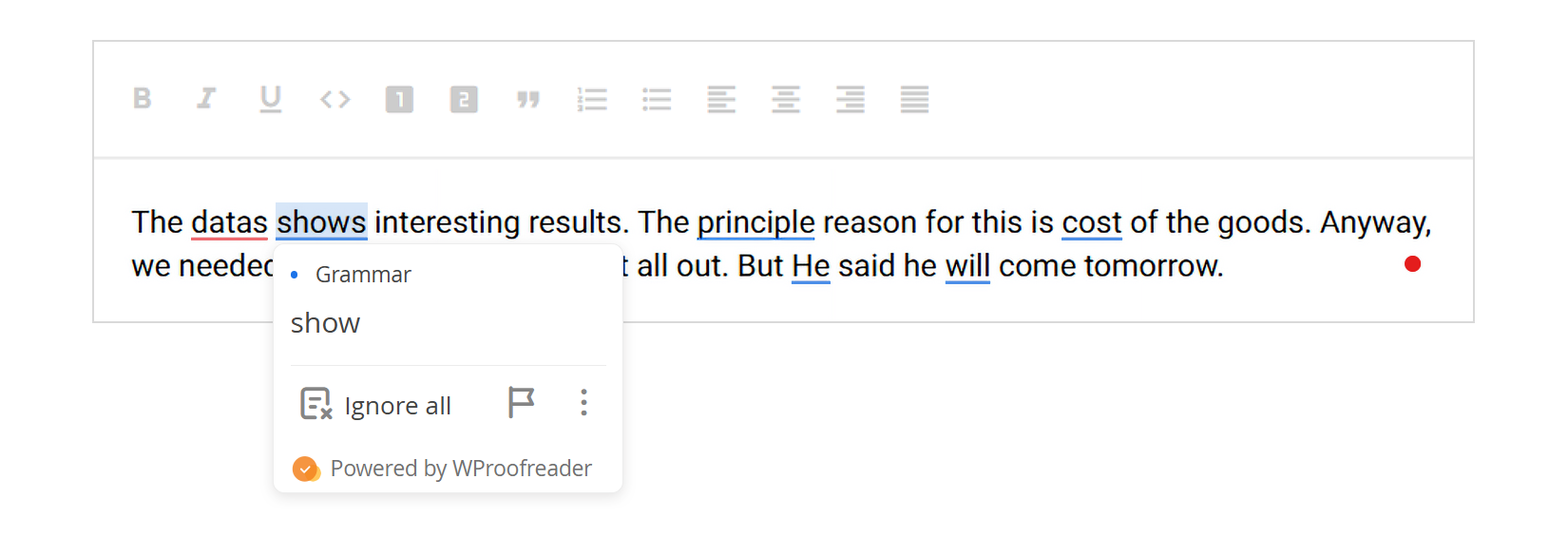
WProofreader detected all errors in the test text inside our Slate setup.
Beyond simple error detection, WProofreader uses different underline colors for different types of mistakes. That makes it easier to understand whether the issue comes from spelling, grammar, or style suggestions while editing text inside Slate.
Wonder how these color-coded suggestions work? Check out our article Behind colorful lines: how digital proofreaders classify writing errors.
WProofreader also shows correction suggestions directly on hover. You do not need to open separate menus or click through each error one by one. The editor displays the issue type, explanation and replacement suggestions right inside the editing flow.
Summary
- Slate gives developers a huge amount of flexibility when building custom editing experiences. At the same time, that flexibility makes text checking integration much more complicated than in traditional WYSIWYG editors.
- Developers can still integrate external proofreading solutions through browser extensions, APIs, or SDK-based approaches. However, some tools miss grammar issues, others behave inconsistently during typing and certain integrations require extra work just to stay stable in complex editor setups.
- WProofreader stands out as one of the most complete options for Slate integrations. It integrates easily with custom Slate-based editors without requiring deep changes to the existing architecture. It supports multiple languages and handles spelling, grammar, and style issues in real time while keeping the editor workflow stable. The SDK works across cloud and self-hosted setups, giving teams flexibility over privacy and deployment. It also includes AI writing assistance features that help users improve text quality directly inside the editor.
Want to see how WProofreader fits into your Slate setup? Just message us and we’ll walk you through the best way to integrate it into your project 😉
 Tech
Tech News
News