CMS platforms keep getting more powerful every year. They handle structured content, AI features, custom workflows, and full headless setups. However, some old issues never really go away 🫤
Take something as basic as spelling and grammar checks. Most teams turn to browser spellcheck or AI tools for this. These quick fixes may seem appealing at first. But once you start working inside custom editors or complex content fields in modern CMS platforms, they often start to fail in real workflows.
So, what actually works for proofreading inside systems like ButterCMS, Contentful, Craft CMS, and others like them? That’s exactly what we are going to look at here 😉
The state of spell check in major CMS platforms
There is no single standard way to check spelling and grammar in CMS platforms. Each platform handles this challenge differently, and most rely on multiple layers of tools to get the job done.
As a result, spell checking in CMS environments looks more like a collection of different approaches than a single, unified solution. Here are the most common ones:
Spell check method | Description |
Browser spell check | Basic spell checking built into the browser. It highlights errors but often breaks inside custom CMS editors and complex interfaces. |
Built-in CMS spell check | Simple proofreading tools built into the editor. They may support a limited number of languages and focus mainly on basic spelling and grammar. |
AI assistants | Generate, rewrite, and correct text on demand. They do not work in real time and can sometimes produce inaccurate suggestions. |
Third-party plugins | Add-on solutions available through CMS marketplaces or editor extensions. Their quality depends on the integration and editor support. |
SDK | Embedded solutions for developers. They run directly inside CMS editors and provide full control over the user experience and proofreading logic. |
| API | Sends text to an external service for analysis. Works well for centralized validation but does not always fit real-time proofreading scenarios. |
These approaches look different in theory, but in real CMS platforms the built-in solutions are much more limited.
Craft CMS do not have a built-in spell checker in their admin panels or inside their rich text editors. There is no native tool that continuously checks spelling and grammar while users write content in the CMS.
Some teams try to fix this with plugins or editor-specific integrations, but support is inconsistent across setups. As a result, spell checking on these CMS platforms is still mostly external, not built into the core editing experience.
Contentful and ButterCMS uses built-in AI Actions to handle spelling and grammar inside the editor, including options such as Contentful AI Actions and TinyMCE’s AI Assistant. These generative tools are positioned primarily as AI assistants for content creation, although they can also be used to proofread human-written text.
However, there are still clear limitations:
⛔️ Contentful does not provide continuous as-you-type spell checking, so users must run them manually every time.
⛔️ The system relies on generative AI, not deterministic rules. It can rewrite text and change meaning instead of just flagging errors.
⛔️ AI assistants are not dedicated spell checkers. They focus on rewriting and improving text, so they can miss complex mistakes or suggest incorrect changes. This becomes especially noticeable in specialized content, where AI may misinterpret legal terms, industry-specific terminology, or the names of medications and other technical concepts.
⛔️ Finally, let’s not forget that these tools are based on generative AI, so they can make mistakes, misread context, or produce unreliable suggestions.
Want to see TinyMCE’s AI Assistant in action? Read more in our article TinyMCE spell check capabilities.
Despite these limitations, there is another layer of tools focused specifically on proofreading.
These are dedicated spelling and grammar checking solutions built to fill this gap. They can work as browser extensions, integrate as plugins inside editors, or be embedded directly into CMS environments through SDKs or APIs. Unlike native or AI-based features, these tools focus on text checking in real time and are designed to work consistently across different content structures and editors.
WProofreader—a real-time proofreading layer for CMS platforms
WProofreader is a toolkit for multilingual spelling and grammar correction. It helps users and teams write with confidence in 20+ languages, while keeping your data secure.
It’s available in two flexible formats to match your workflow:
✅ WProofreader browser extension for individuals or teams who write across different online platforms. Use it to proofread emails, documents, posts, or any web content right in your browser. On the free plan, your text is checked via our secure cloud. Corporate users can access additional features and request self-hosted deployment if needed within a Business plan.
✅ WProofreader SDK helps CMS vendors, developers, and content teams add real-time spelling and grammar checking directly to their editing environments. It integrates with HTML controls and popular editors such as CKEditor, Froala, TinyMCE, Quill and others, making it easy to bring proofreading into custom CMS interfaces and content workflows.
No matter how you deploy WProofreader, you can rely on the same proofreading features across your workflow.
- Real-time correction in 20+ languages, including AI-based English, German, and Spanish;
- Autocorrect and autocomplete features;
- Automatic language detection;
- Organization-wide and user custom dictionaries;
- Medical dictionary for English, Spanish, French and German;
- Legal dictionary for English and its dialects;
- Style suggestions for non-inclusive language, profanity, dialect variations, anglicisms and other tone issues.
- Style guide builder with customizable rules for your whole team or organization;
- AI writing assistant 🪄 It is a human-trained paraphrasing and content generation tool. We have put significant effort into creating and testing predefined prompts for various text operations. It helps you take your writing even further: rewrite, paraphrase or summarize in just a few clicks. Available in English, German, Spanish, Portuguese, French, Dutch, Swedish, Danish, Norwegian Bokmål and Italian, Polish and Ukrainian—with more tone and style options coming soon!
- The analytics dashboard gives you a clear, readable picture of how WProofreader is used in real workflows. You can see the overall word volume your team processes and how often features like autocorrect step in to help.
Want to see these features in action? Test them on our demos before integrating the solution into your workflow.
WProofreader also helps organizations meet strict security requirements. It encrypts text data and follows GDPR and HIPAA guidelines to support secure content processing.
Now let’s step out of theory and look at how this works in real setups. We’ll compare WProofreader with other spell check tools that you can integrate into CMS platforms.
Comparing third-party spell check solutions for CMS platforms
We will use free versions of spelling and grammar checking tools that can be integrated into CMS platforms.
Here is the sample text we will use for testing:
Yesterday, I goed to a meeting with our content team, where we discussed how the childs in our target audience engage with educational materials. The datas shows they respond more better to visual content than to plain text. Sales boys doesn’t think we need to update our strategy, but I can’t wait to show her the results tomorrow, cuz the team’s approach has been very affective so far. I have a freind in the analytics department who already picked up some interesting patterns in the latest report. She also said he will present the findings on Monday January 10th.
Let’s break down the types of errors found in this text.
| Category | Mistake |
| Spelling | childs → children |
| datas → data | |
| freind → friend | |
| Style | Sales boys → sales staff |
| Grammar | goed → went |
| more better → better | |
| doesn’→ don’t | |
| cuz → because | |
| affective → effective | |
| already → has already | |
| he will → he would | |
| Monday January 10th → Monday, January 10th |
Overall, we made a disappointing 12 mistakes 😁
If you want a deeper breakdown of how different types of digital proofreaders classify and detect these kinds of issues, check out the article Behind colorful lines: how digital proofreaders classify writing errors.
Grammarly
Grammarly is a popular tool for checking spelling and grammar in online writing. It works mainly as a browser extension, but also offers an API for product integrations.
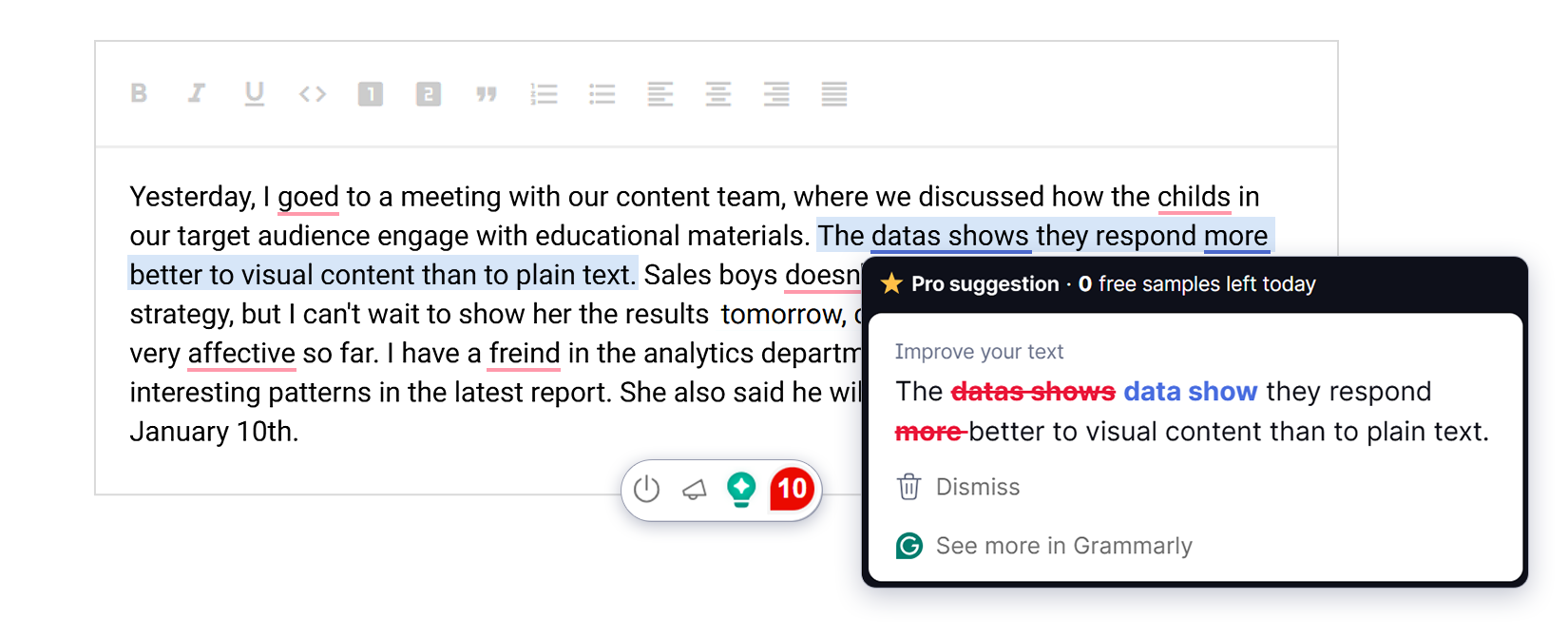
Grammarly detected only 10 errors in this text. It handled basic spelling and grammar issues quite well and fixed most of the obvious mistakes.
However, it did not focus much on deeper problems like style issues or verb tense consistency. These types of errors often matter in real content workflows, especially in professional writing, but Grammarly tends to treat them less strictly compared to direct spelling mistakes.
Another limitation comes from its suggestion system. Grammarly shows corrections as suggestions, and once you run out of available suggestions in the free version, you can no longer see or apply specific fixes.
Sapling AI
Sapling AI is a writing assistant that focuses on spelling and grammar checking in real time. It integrates mainly through a browser extension and API, allowing it to be used inside web apps, customer support tools, and custom writing interfaces.
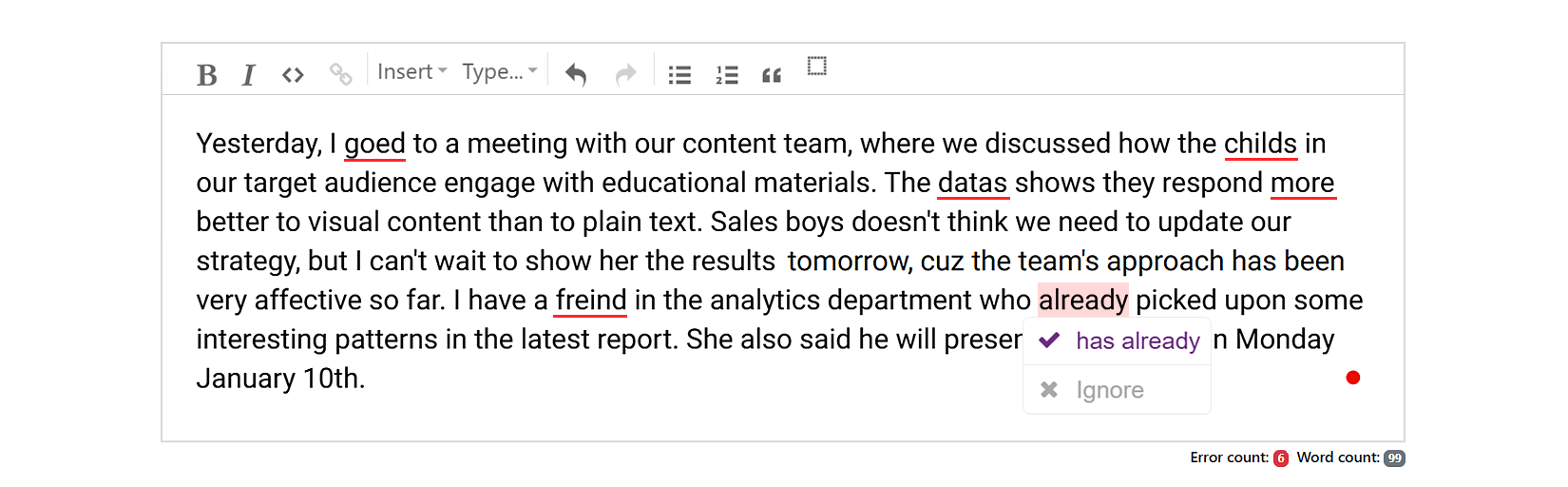
Sapling AI detected only 6 basic errors in the text, mostly related to spelling. It performed well on simple corrections but missed more complex grammar and style issues.
Another limitation is how it presents suggestions. Sapling uses a single, uniform highlight style for all issues, without clear categorization or explanation. It does not explain why a change is needed, which can make corrections feel less transparent in more complex or ambiguous cases.
Writer
Writer is an AI writing platform that combines proofreading features with a broader generative writing assistant. It runs on Writer’s Palmyra models and supports enterprise integrations through agents and connectors, including CMS-related workflows. This tool can work with content, assets, and even publishing tasks inside connected systems.
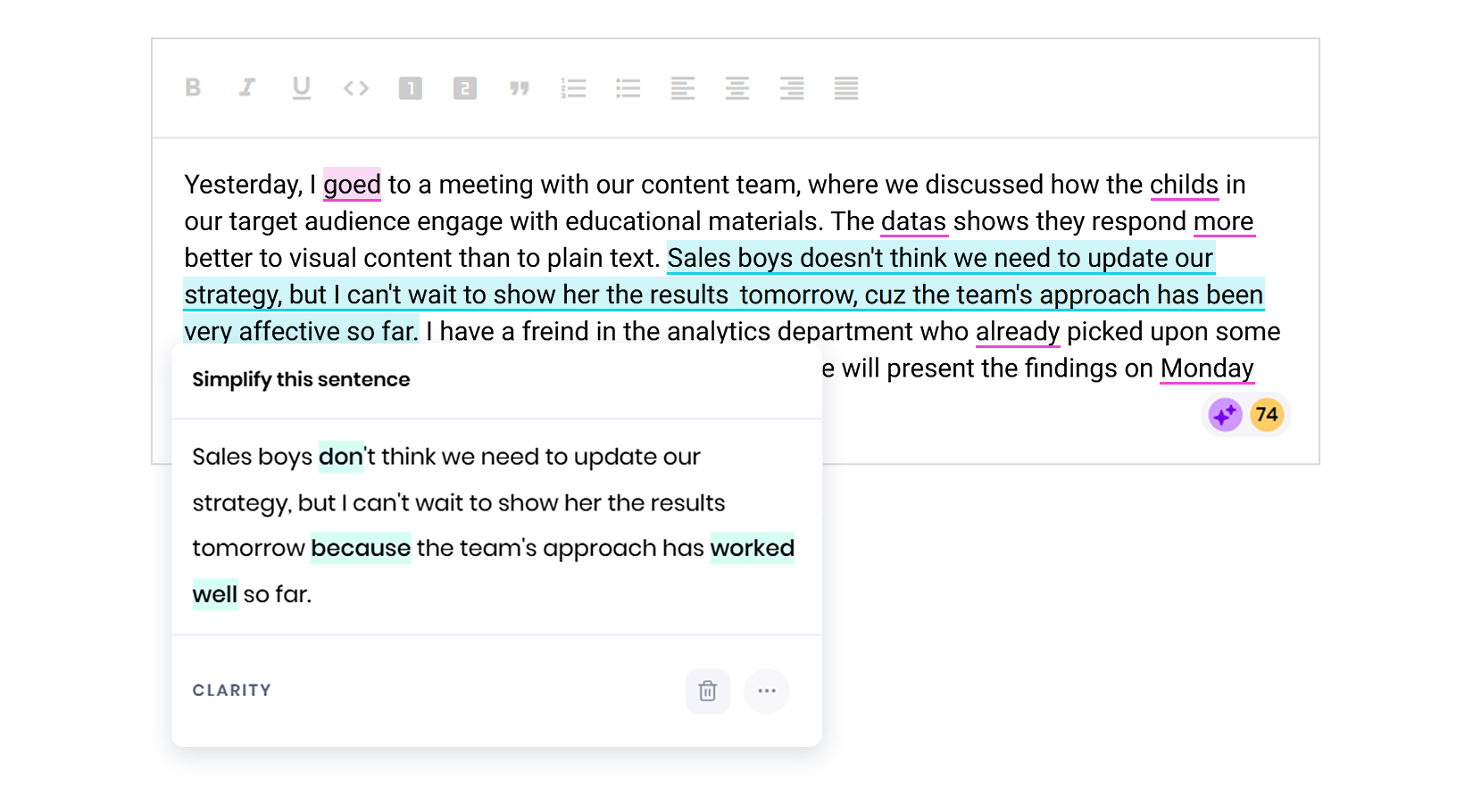
Writer detected 10 out of 12 errors in our test text. It held most of the spelling and grammar mistakes. However, it missed the stylistic error and the verb tense consistency issue.
Another limitation is how suggestions are presented. Writer typically offers a replacement without explaining why a particular change is recommended. It also provides limited visual distinction between error types. For example, grammar and spelling issues use the same highlight color, making it harder to quickly understand the nature of a problem while editing.
WProofreader
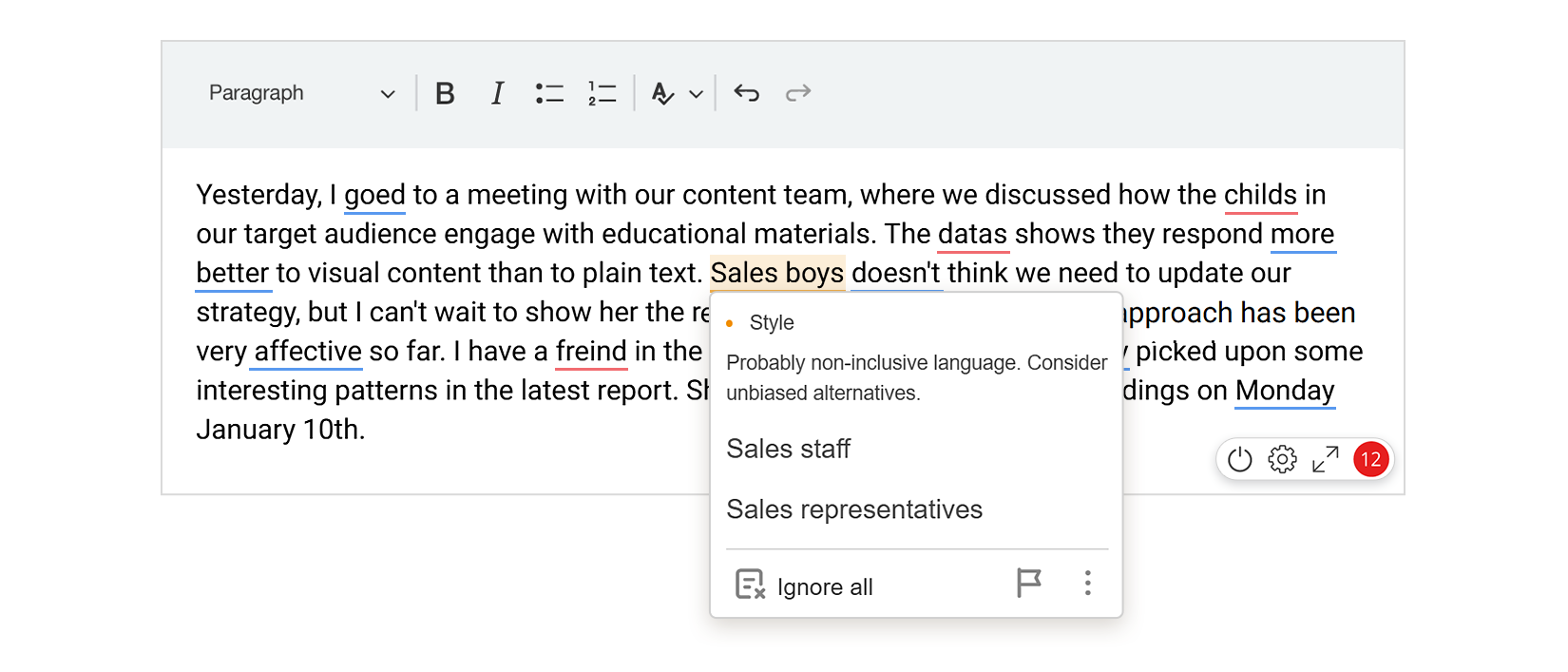
WProofreader detected all 12 out of 12 errors in the test text and corrected them across spelling, grammar, or style.
WProofreader separates mistakes into clear categories and uses different underlying colors to mark each type. This makes it easy to instantly understand what kind of problem you are dealing with 😉
All suggestions are available without hidden limits in the workflow, so you don’t run into situations where corrections suddenly stop or become unavailable in the middle of editing.

WProofreader browser extension
Free for individual users and 14 days-trial for business users.
Explore moreSummary
✅ Spell checking in modern CMS platforms remains surprisingly fragmented. Craft CMS largely rely on browser-based solutions, while Contentful and ButterCMS take a different route with AI-powered writing tools. Each approach can help with content quality, but none provides consistent, real-time proofreading across all editing scenarios.
✅ Third-party solutions help close this gap through browser extensions, plugins, SDKs and APIs. However, the quality of proofreading varies significantly between tools. Some tools catch basic spelling mistakes but miss more complex grammar and style issues.
✅ In our test, WProofreader detected all 12 errors across spelling, grammar and style categories. It provides real-time validation as-you-type mode. This tool clearly distinguishes between different error types and works across cloud and self-hosted environments. It makes it a practical option for CMS teams that need reliable proofreading without depending on browser spellcheck or generative AI workflows.
Want to see how WProofreader could fit into your CMS environment? Contact our team and explore the integration options available for your project.

 Tech
Tech News
News