TinyMCE remains one of the most popular rich text editors for web apps. Dev teams plug it into CMS platforms, email clients, learning systems and all kinds of blogging tools. People keep picking it because it packs a lot of features and plugs into projects without any hassle.
This WYSIWYG editor gives you a lot of sweet stuff, but there’s always a little sting…
The longer you work with it, the clearer this challenge becomes—proofreading feature. It only offers a basic set of features and can act up if a user relies on the browser’s own text checker. Also, the cloud version handles all the setup and maintenance for you, which is great for most teams. But if your project needs to keep text private or avoid sending data to external servers, this TinyMCE spellchecker setup might not fit.
So, developers keep looking for a text checking tool that delivers stable results while staying fully embedded in the editor. Below we’re breaking down what the built-in TinyMCE spellchecker actually does and whether any proofreading plugin can give you real, full-scale text checking inside the editor.
TinyMCE spell check capabilities
Out of the box, TinyMCE gives you two options for spell checking:
1️⃣ One is your browser’s built-in spelling checker. We covered this in detail in our article about the real pros and cons of browser-based spell checking for team collaboration. So we’ll focus on the second option here 😉
2️⃣ The other is the built-in TinyMCE spellchecker plugin.
They used to offer a free spell checking plugin. But it was deprecated starting with TinyMCE 5.4 and removed it completely in version 6.0. Now TinyMCE offers a paid Spell Checker Pro plugin. It’s available on some Tiny Cloud plans.
This plugin adds a button to your toolbar and a spellcheck item in the tools dropdown menu. Spell checking kicks in automatically when users start typing. To see correction suggestions, you right-click on the misspelled word.
So, what can this plugin do?
| Feature | Description | Limitations |
| Spellcheck suggestions | Shows correction suggestions in a popup while typing. | Doesn’t detect grammar & style mistakes. |
| Multilingual support | Supports up to 13 languages at once, including medical terms. | There’s no clear, user-controlled language autodetect option in the UI. The system supports several languages, but selecting one turns off the others, so users still have to manage this manually. |
| Custom dictionary | Lets developers configure a global dictionary that applies to all users. | No personal user dictionaries. Individual users can’t save their own custom words. |
Besides the issues on the table, there are a few more things worth knowing about.
📍TinyMCE blocks the browser’s standard context menu by default. Users might not immediately see the familiar error suggestions they’re used to.
📍The checker highlights a misspelled word and offers suggestions, but it doesn’t categorize errors or provide deeper linguistic analysis. It works fine for simple typos and basic spelling fixes, but it doesn’t give insights into the type of error or subtleties of the text.
📍Another point to note is that the Spell Checker Pro requires a click on each highlighted word to see suggestions. It doesn’t automatically display options on hover. For longer documents or dense text, this can slow down the editing workflow, as users need to manually interact with every single flagged word.
None of these issues are dealbreakers, but they’re good to know upfront.
What really limits text editing is the lack of grammar checking, automatic language detection and shared team dictionaries. That’s why dev teams look at specialized solutions.
One possible solution might be WProofreader ✍️ which is built to cover those missing capabilities.
WProofreader spell and grammar checker for rich text editors
What is WProofreader?
It’s an AI-powered proofreading tool that catches spelling and grammar mistakes in real time across 20+ languages. It integrates with WYSIWYG editors and HTML editable controls, with deployment options that keep your data secure.
You can choose from two options depending on your needs:
✅ WProofreader SDK works for teams building apps with TinyMCE or integrating it into popular CMS platforms like WordPress, Joomla, and Drupal. This setup also comes ready to integrate with other HTML controls and popular WYSIWYG editors like CKEditor, Froala, Quill, Syncfusion and Tiptap. You embed it directly into your editor, connect it through a standalone API, and control where and how text gets checked. With WProofreader SDK, you can choose cloud or self-hosted deployment. The self-hosted option is suited for larger projects that require full control and enhanced data security. For smaller sites, such as standard WordPress installations, cloud deployment provides a reliable, fully managed solution.
✅ WProofreader browser extension fits teams exploring integration options or individual developers who need quick text checking across different platforms. It runs in your browser and works with any web-based editor, including TinyMCE implementations. The free plan processes text through a secure cloud. Business plans add more features and let you request self-hosted deployment for tighter security. Good for testing integration approaches before committing to the full SDK.
No matter which WProofreader version you pick, you’ll benefit from all the features you need for a comprehensive proofreading workflow:
- Automatic language detection;
- Real-time correction in 20+ languages, including AI-based English, German and Spanish;
- Autocorrect and autocomplete features;
- Organization-wide and user custom dictionaries;
- Medical dictionary for English, Spanish, French and German;
- Legal dictionary for English and its dialects;
- Style suggestions for non-inclusive language, profanity, dialect variations, anglicisms and other tone issues;
- Style guide builder with customizable rules for your whole team or organization
Starting with TinyMCE 6, WProofreader offers a dedicated plugin that adds the toolbar icon automatically and applies a TinyMCE-friendly blue theme. So everything looks and feels native inside the editor. Find out more on our github 😉
If you’re using other editors, you can check the full list of supported WYSIWYG integrations on our demo page. If the editor can render a standard editable HTML element, WProofreader will work with that element directly without being tied to a specific framework.
This makes WProofreader one of the most reliable options for adding professional text checking to rich text editors. And here’s the bonus: it doesn’t conflict with other spell checkers. If users want to keep their browser’s built-in checker running alongside WProofreader, they can. No override issues like you get with Spell Checker Pro.
WProofreader also prioritizes the data security of our users. All data moves through HTTPS connections with modern TLS encryption. The cloud infrastructure runs on secure AWS servers. Need stricter control? You can deploy everything on your own servers and keep all data in-house.
WProofreader follows GDPR requirements and helps organizations meet HIPAA standards. Whether you’re handling sensitive medical records or just want to protect user privacy, the security model adapts to your compliance needs.
Phew, enough theory 😮💨 Let’s see how these spell checkers actually perform.
We’ll test both WProofreader and TinyMCE’s Spell Checker Pro on the same error-filled text and see what they catch.
Here’s our test example:
The CEO asked the hiring managers if they was reviewing candidates for the senior role, becose he wanted to ensure they picked the best man for the job. The team told they’re confidend about there decision, however the final interview reports wasn’t submitted yet.
This sample contains simple spelling mistakes and more complex issues. Some errors blur the line between spelling and grammar, like there decision. We’ve also thrown in stylistic problems like cuz and non-inclusive language. Let’s see how many of these 10 errors each spell checker identifies.
TinyMCE’s Spell Checker Pro
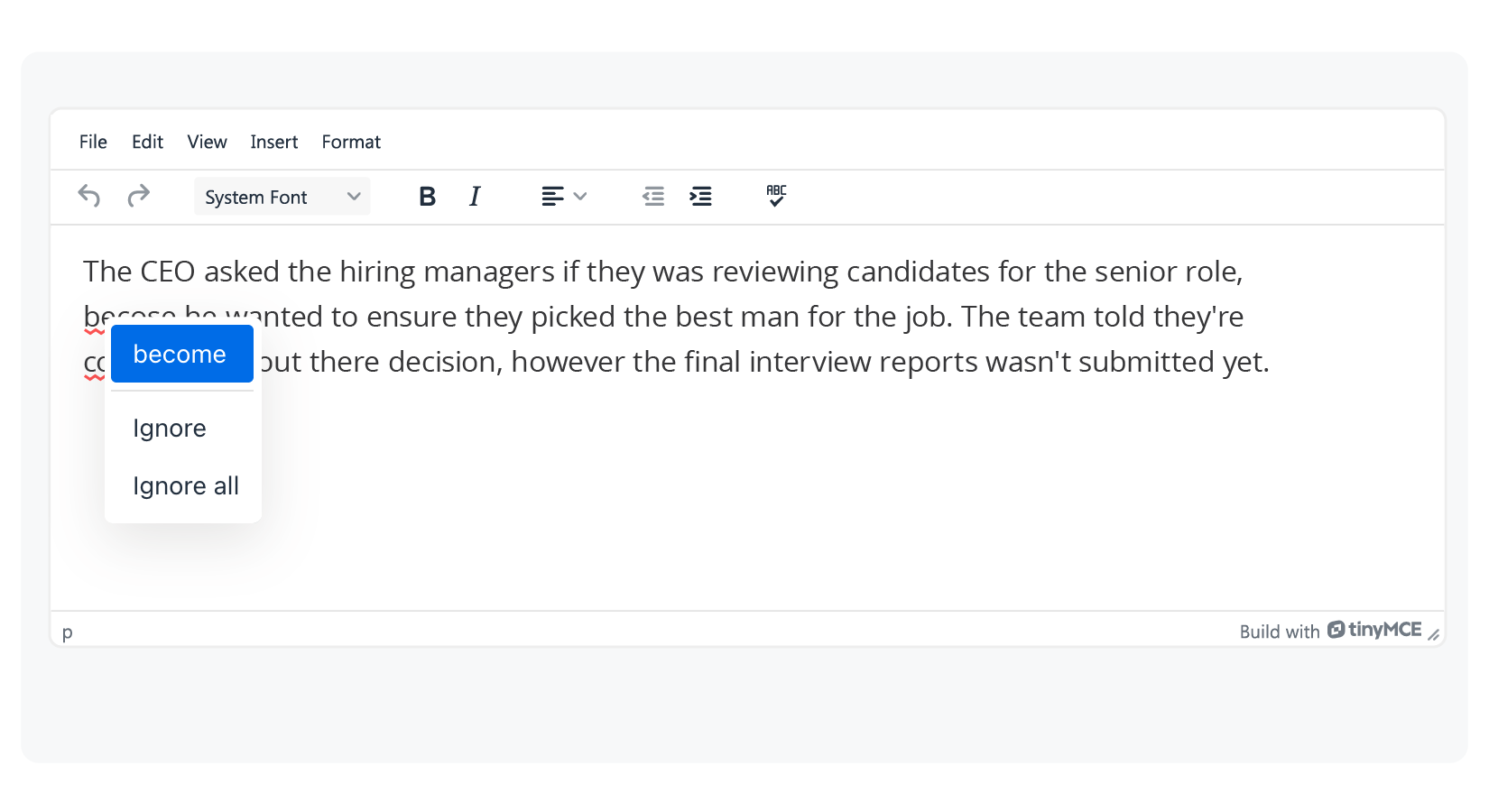
Out of 10 errors, it caught only 2. And even for the word becose, it did mark it as wrong, but the suggestion it gave was become, which doesn’t fit here. This shows the built-in spell checker doesn’t get the meaning of the sentence and just suggests a word that looks similar in letters or length.
WProofreader
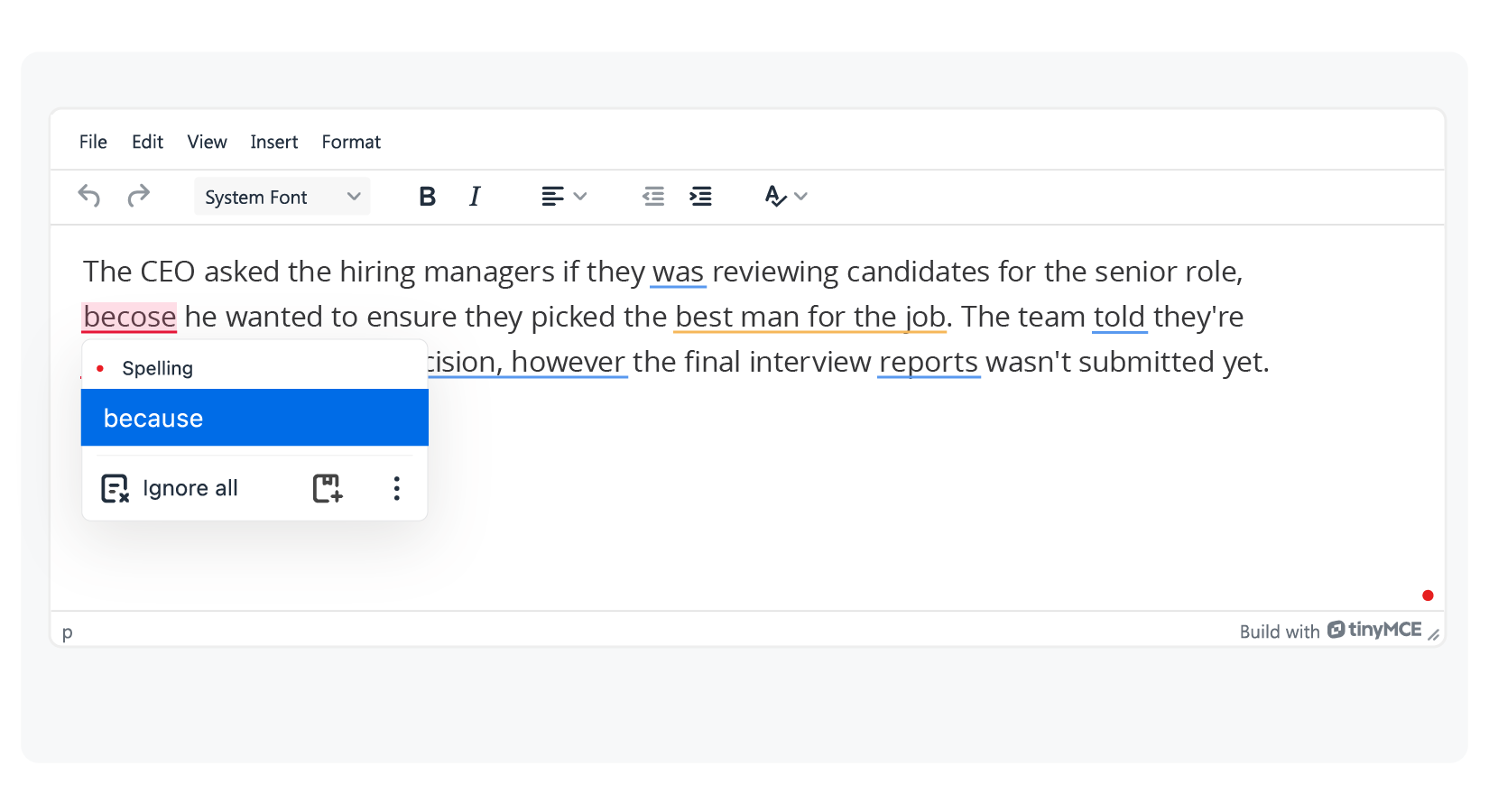
WProofreader identified all 10 issues right away and suggested corrections across three categories:
• Spelling
• Grammar
• Style
Beyond just finding errors, WProofreader uses different colored underlines for different error types. You can instantly tell what’s wrong: a misspelled word here, incorrect verb tense there, agreement issues, or a suggestion to swap best man for the job for more inclusive language.
Want to understand what each color means? Check out our article Behind colorful lines: how digital proofreaders classify writing errors. These color-coded corrections work the same way in every.
Furthermore, you don’t need to click on words with mistakes one by one to see correction options, as you do in TinyMCE’s Spell Checker Pro. Just hover over any underlined word to see what type of error it is and get correction options. You can also read the description explaining exactly what’s wrong. Then just one click applies the fix 😉
Before we wrap up, it’s worth mentioning that both tools offer AI Assistant for editing and improving your text. These are powerful tools that will also be useful for your work with texts.
TinyMCE vs WProofreader AI capabilities
TinyMCE’s AI Assistant works with Google Gemini, AWS Bedrock, Azure AI, or OpenAI ChatGPT using your API key. You control the parameters like temperature and token limits, and since you’re using your own GPT account, you can tap into custom GPT models.
The AI Assistant comes with preset prompts for common tasks: summarize, improve, simplify, expand, trim, change tone, change style, and translate into 13 languages. You can also write custom prompts in a dedicated panel on the toolbar.
It’s available as a paid add-on for Essential, Professional, or Enterprise plans.
Let’s say you want to polish a message to your team. You need to improve clarity, consistency, and style while keeping the original tone intact. We’ll use the “Improve” option that both tools offer on this text:
Hey team so we got this meeting today need to talk about results like overall quarter stuff sales seem kinda fine but also not really and efficiency of the department some questions too so yeah we gotta go through that. Then also new projects are starting I don’t really get what stage they are at like maybe just started but anyway need to check. Also I wanted us to make a plan at least for next month cuz right now it’s not clear who’s doing what and what we even do next. And in general I guess we should go over tasks again cuz not everything’s closed and there are delays.
TinyMCE AI Assistant results
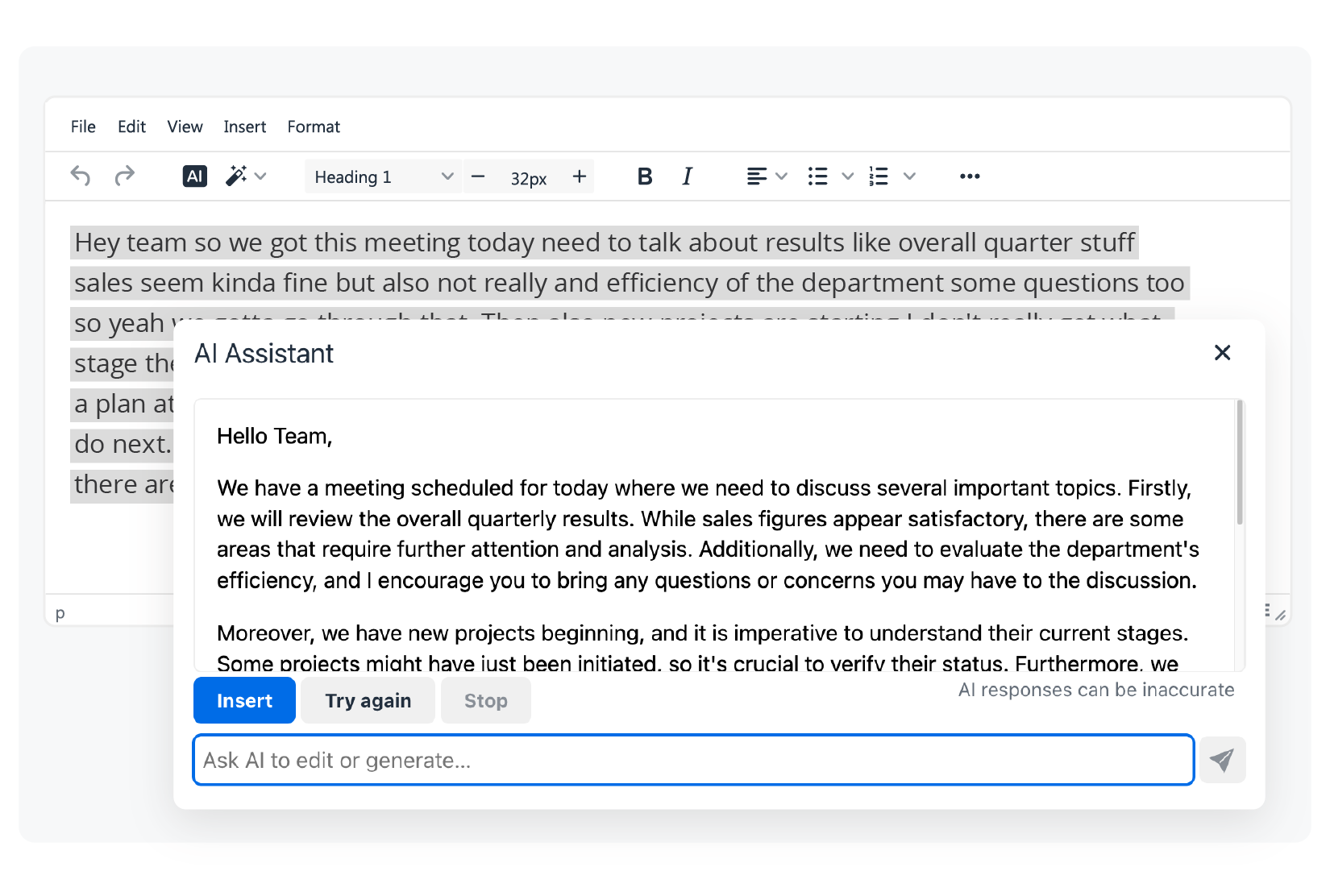
TinyMCE handled the task pretty well. After selecting the prompt to process the text, a panel opens up, taking half the editor space. The AI generates the improved text in real time right there.
WProofreader AI writing assistant 🪄
WProofreader AI writing assistant 🪄 helps you rewrite and refine text using models trained with real human feedback. We’ve put a lot of work into building and polishing preset prompts that handle a bunch of everyday writing tasks. Instead of editing everything by hand, you can clean up your content faster and draft documents way more efficiently. It also keeps your tone consistent, supports the brand voice of your organization and helps you sound sharp and professional in every message.
This feature is available in English, German, Italian, Spanish, Portuguese, French, Dutch, Danish, Norwegian Bokmål, Swedish, Polish and Ukrainian.
To use the AI writing assistant, just highlight a piece of text (minimum 100 characters) and click the magic badge. Then pick a prompt from the list to work with your text:
- Shorten
- Expand
- Rewrite
- Improve
- Make formal
- Make informal
- Summarize
- Proofread
All of these text operations include built-in instructions to avoid common AI patterns, like repetitive phrasing, overly regular sentence structures and predictable word choices. This keeps your content sounding more natural.
Let’s see how WProofreader could improve our message.
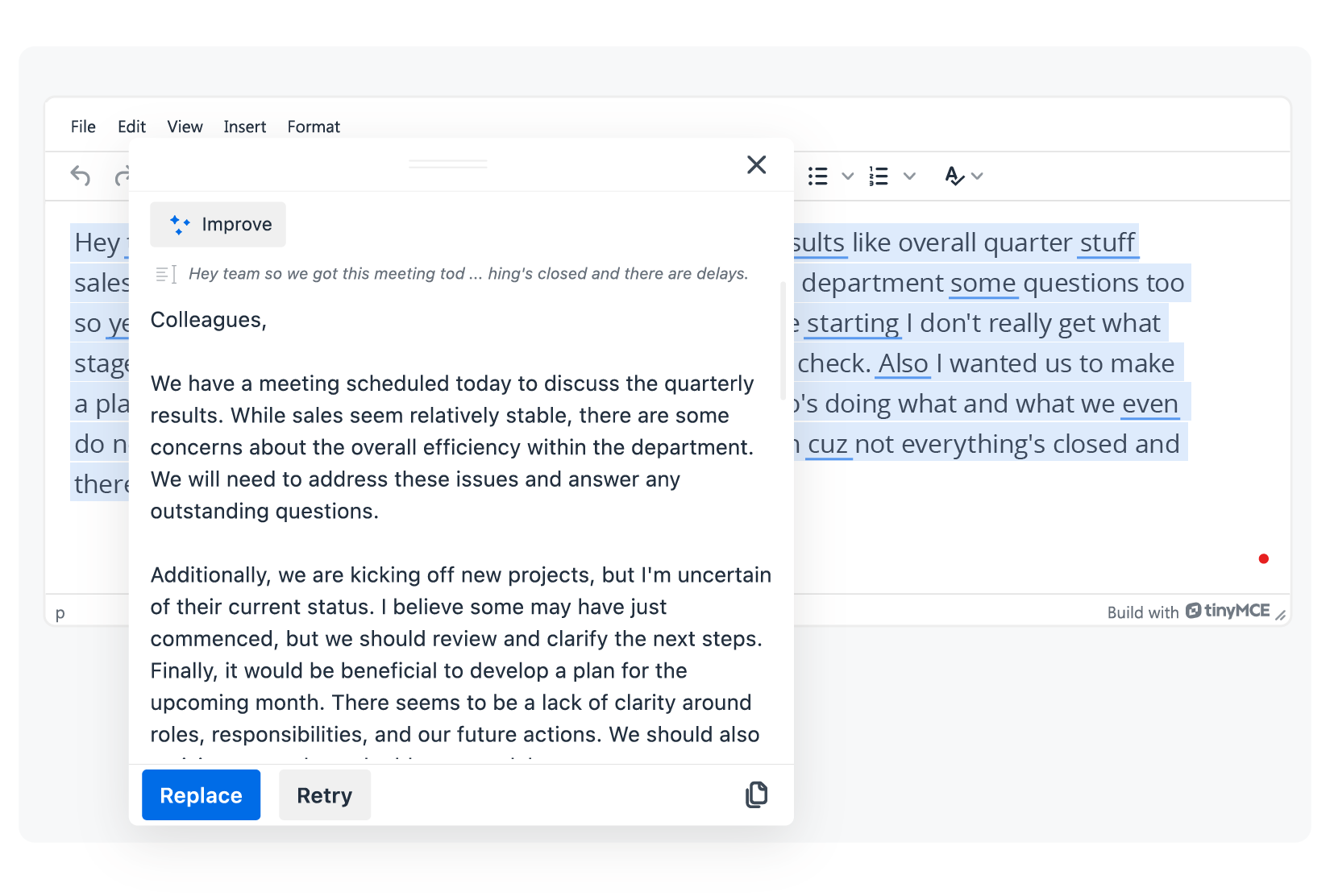
WProofreader’s AI assistant transformed the messy text into a clear, professional message. It kept the original meaning but organized everything into proper paragraphs with smooth transitions. The tone shifted from casual and scattered to polished and business-appropriate without losing the intent.
The AI writing assistant appears in a dialog box that you can drag anywhere on your screen. All available prompts show up right there in the same window. After the text gets processed, you can either replace your selected text with the new version or regenerate the response if you want to try again.

WProofreader AI writing assistant
Rewrite and text generation for business and individual users.
Explore moreTry out this and lots of other features of the WProofreader plugin for TinyMCE editor in our demo.
Conclusion
- TinyMCE offers a few options for spell checking right out of the box. The built-in browser checker works for basic typos, but it’s inconsistent across browsers and doesn’t give you much control.
- TinyMCE Spell Checker Pro is a paid plugin. It handles spelling across multiple languages and lets you create custom dictionaries. However, it has notable limitations: it doesn’t check grammar or style; language detection is manual; you can’t share dictionaries across teams. And if you run into conflicts with browser checkers or need self-hosted deployment, you’ll face extra configuration headaches. So, for teams that need more than basic spell checking, third-party solutions fill the gaps.
- WProofreader stands out as a comprehensive option that integrates easily with TinyMCE and other WYSIWYG editors, regardless of your framework. This multilingual spellchecker tool catches spelling, grammar, style issues, and non-inclusive language in real time. You can deploy it in the cloud or self-host it based on your security requirements. Any version gives you access to WProofreader AI writing assistance, automatic language detection, autocorrect and autocomplete features. These and a lot of many other functions help teams keep their content high-quality without needing a complicated setup.
Curious how WProofreader fits into your workflow? Message us and we’ll show you the best setup for your needs ☺️

 Tech
Tech News
News