Draft.js gives developers a flexible foundation for building rich text editors in React applications.
However, adding spell checking to a Draft.js editor is not as straightforward as adding the editor itself. Draft.js does not include a full spell checking solution, so developers need to use the browser’s native checker or integrate a third party tool.
Native spell checking handles basic spelling mistakes but gives developers little control. Third party tools can offer spelling and grammar checking, but they differ in features, integration methods and development requirements.
So, which option works best for a Draft.js editor? 🤔
Let’s compare the main spellchecking solutions and see how they handle spelling and grammar checking in custom-rich text applications.
Understanding Draft.js integration capabilities
Draft.js was designed as a framework for building rich text editors in React applications. It provides the core editor state, content model, and rendering logic, allowing developers to build tailored editing experiences around their product needs.
This architecture directly determines how spell checkers can be integrated. Developers can rely on the browser’s native spell check, count on browser extensions, send content to an external checking API, or integrate a dedicated UI/JS SDK. Each approach interacts with the Draft.js editor state in a distinct way.
Below are the main integration approaches teams can use for spell checking in Draft.js:
| Integration approach | How it works with Draft.js | Common limitations |
| Browser native spellcheck | Uses the browser’s built-in spell checking within the editable area (spellCheck={true}). | Limited to basic spelling, lacks grammar/style checking, and offers no control over visual styling or custom dictionaries. |
| Browser extensions | Relies on third-party browser extensions modifying the editor overlay. | Direct DOM mutations by extensions often desynchronize the DOM from Draft.js EditorState, causing cursor jumps or render crashes. |
| API | Sends plain text or ContentState to an external text-checking endpoint. | Requires custom logic to map offset positions back to Draft.js selections and manage inline highlight decorations. |
| SDK | Connects Draft.js with a dedicated UI/JS proofreading SDK. | Requires architectural compatibility (e.g., native React/Draft.js decorator support) or custom wrappers for state synchronization. |
The main technical challenge is keeping spell checking in sync with Draft.js state. A solution needs to identify mistakes without interfering with content updates, cursor position or the editor’s rendering process. This can make third party integrations more complex than adding a spell checker to a standard editable field.
For developers, the ideal setup should fit into the existing editor architecture without requiring major changes to the application. It should handle mistake detection and highlighting reliably while keeping the editing experience smooth.
This is where dedicated integrations with Draft.js can offer an advantage over approaches that require developers to build the integration layer themselves.
WProofreader for Draft.js
WProofreader is an AI-powered text checking solution that provides real-time spelling and grammar correction in 20+ languages.
It can work with web-based rich text editors and HTML editable content, allowing developers to add advanced text checking without rebuilding the editor from the ground up.
WProofreader offers two integration options:
✅ WProofreader SDK is designed for applications built around custom editors such as Draft.js and other React-based RTEs. Developers can integrate it into an existing editor architecture, configure how text is processed and choose between cloud-based or self-hosted deployment. This gives development teams more control over data handling while avoiding major changes to the existing editor setup.
✅ WProofreader browser extension is a practical option for testing and early-stage projects. It works directly in the browser and can check text in web-based editors, including custom Draft.js implementations. Text processing runs in the cloud by default, while business deployment options provide additional control for teams with stricter security and data handling requirements.
Both options include the full set of features for comprehensive proofreading:
- Real-time multilingual correction, including AI-based English, German, and Spanish;
- Autocomplete feature;
- Automatic language detection;
- Organization-wide and user custom dictionaries;
- Medical dictionary for English, Spanish, French and German;
- Legal dictionary for English and its dialects;
- Style suggestions for non-inclusive language, profanity, dialect variations, anglicisms and other tone issues.
- Style guide builder with customizable rules for your whole team or organization;
- AI writing assistant 🪄 It is a human-trained paraphrasing and content generation tool. We have put significant effort into creating and testing predefined prompts for various text operations. It helps you take your writing even further: rewrite, paraphrase or summarize in just a few clicks. Available in English, German, Spanish, Portuguese, French, Dutch, Swedish, Danish, Norwegian Bokmål and Italian, Polish and Ukrainian—with more tone and style options coming soon!
- The analytics dashboard gives you a clear, readable picture of how WProofreader is used in real workflows. You can see the overall word volume your team processes and how often features like autocorrect step in to help.
You can try out most of these features in our demos.

WProofreader SDK for developers
Available as a cloud or on-premise solution. Try for free.
Explore moreWProofreader can fit into custom editor setups without requiring developers to build their own proofreading logic. Below, we show how the SDK can be integrated with Draft.js in just a few steps.
1. Package installation
You install the SDK once per project using npm.
npm install @webspellchecker/wproofreader-sdk-js2. Module import
You import WProofreader in the same place where you initialized your Draft.js editor instance.
import WProofreader from '@webspellchecker/wproofreader-sdk-js';3. Initialization
After your Draft.js editor renders and the editable DOM element is available, you initialize WProofreader and connect it to that container.
WProofreader.init({
  container: editorEditableElement,
  serviceId: 'YOUR_SERVICE_ID_HERE',
});
The only things you need to set up are:
✅ container—your editor’s editable DOM element
✅ serviceId—your activation key
Try out WProofreader live on Draft.js on our demo page.
Let’s compare the main spell checkers for Draft.js and see what they offer.
Comparing spell checkers for Draft.js
Below, we’ll compare the free spell and grammar checking options available for Draft.js using the same demo text with a few intentional mistakes.
we pushed the new dashbord last week, and most of the team alreadi uses it every day the backend is prety simple but the amount of man-hours that went intoo the ui are actualy impressiv. i added a smal filter for project status, and somehow every one started usin it immediately
Google Chrome browser spell check
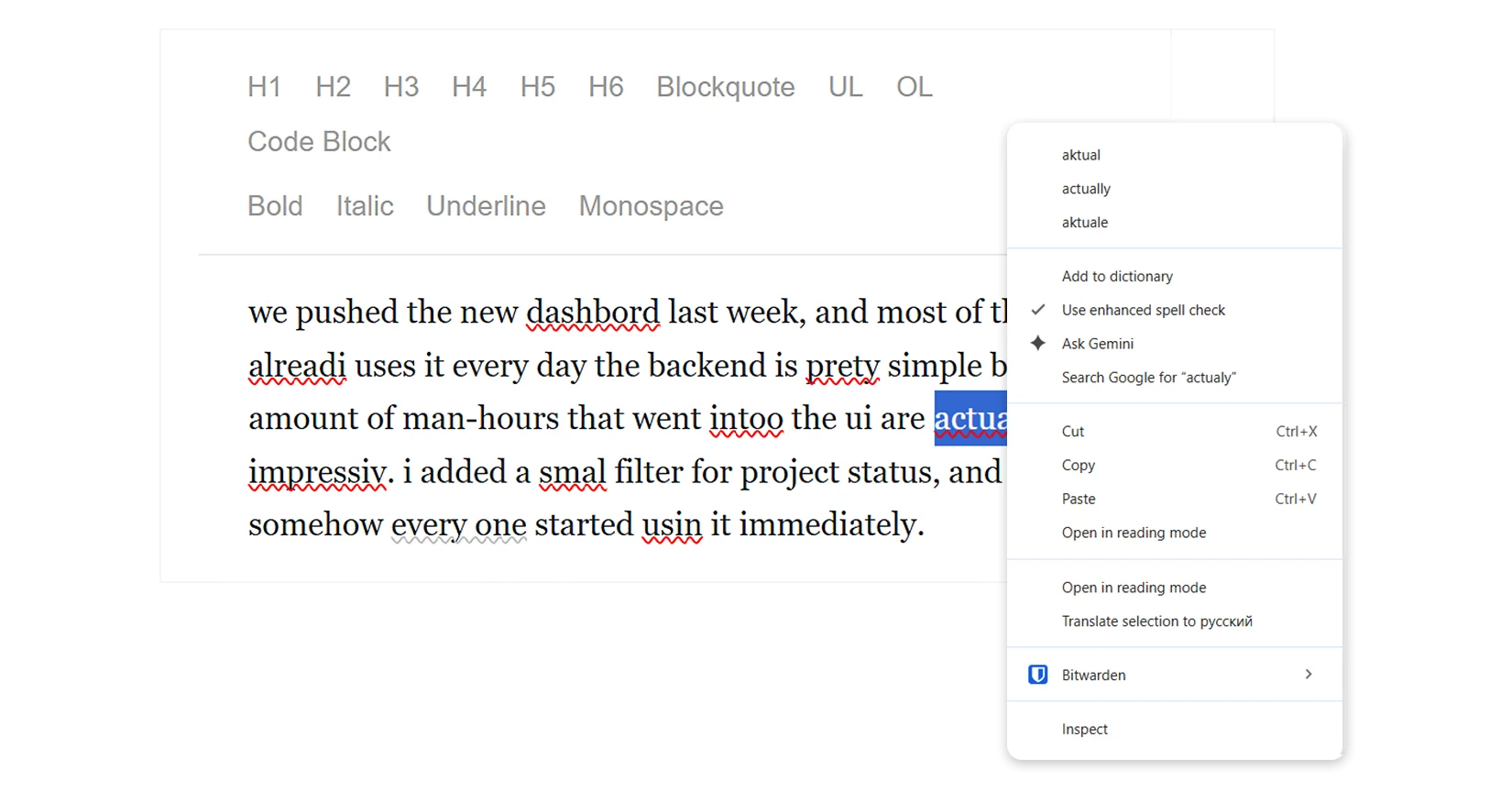
Native browser spell check focused only on spelling errors. It missed the punctuation and style issues in our test text, showing that the built-in browser checker offers only basic proofreading capabilities.
Read more about the real pros and cons of the native browser spellchecker 😉
Grammarly
Grammarly is one of the most well-known proofreading extensions. We’ve already taken a look at its features in comparison to those of the ChatGPT for reviewing texts. Let’s see how this tool handles our sample text.
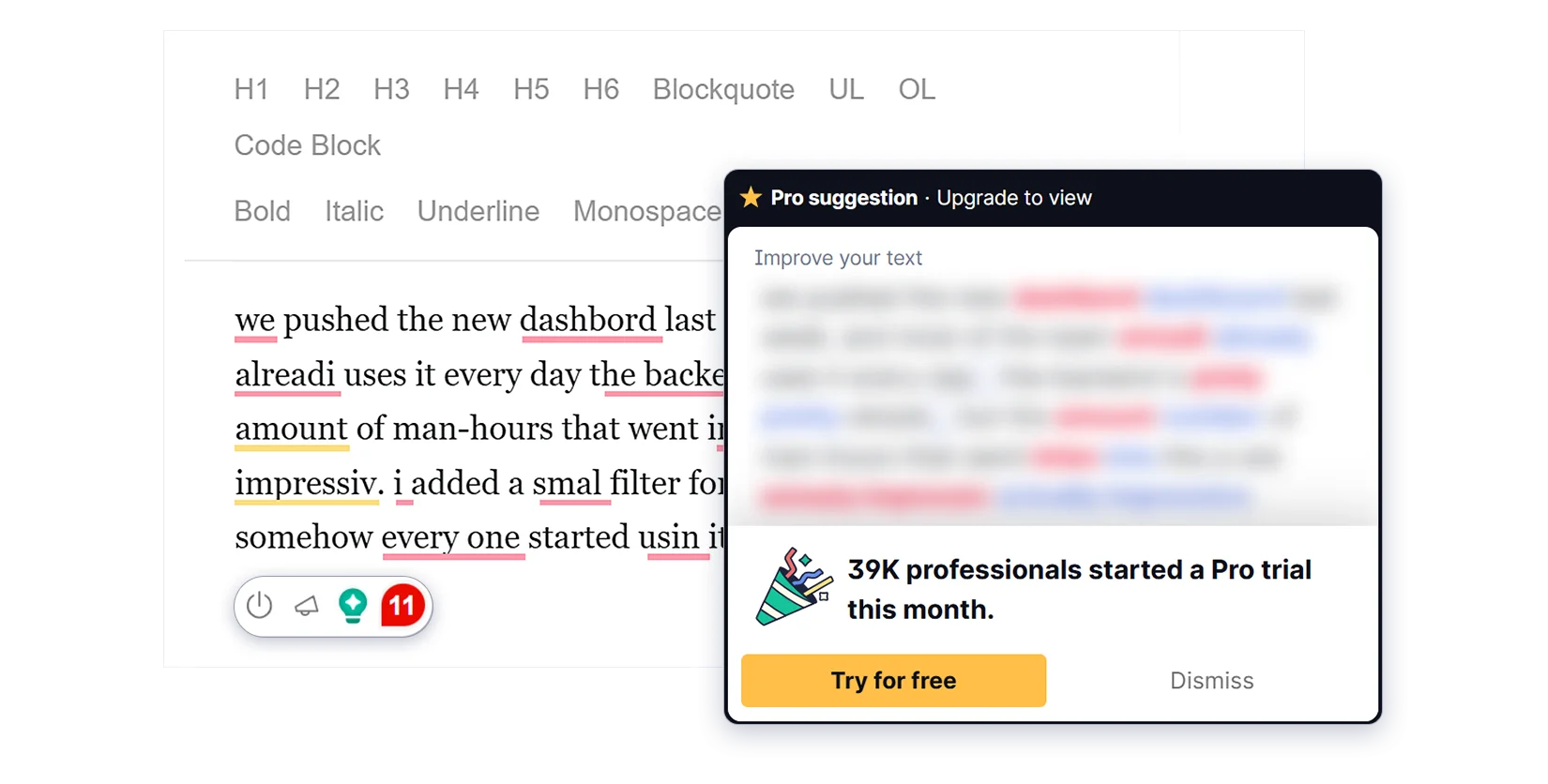
Grammarly detected 11 out of 16 errors in our test text. It caught most of the spelling and grammar mistakes, but missed some issues, including the capitalization of “UI” and “the” after the new sentence. It also did not flag “man-hours” as a style issue. Some suggestions and features are only available with Grammarly Pro, so the results can vary depending on the paid plan.
Sapling
Sapling offers a dedicated integration for Draft.js with grammar and spell checking, fluency suggestions, autocomplete, and reusable text snippets. Developers can add these features to their applications through Sapling’s SDK or API.
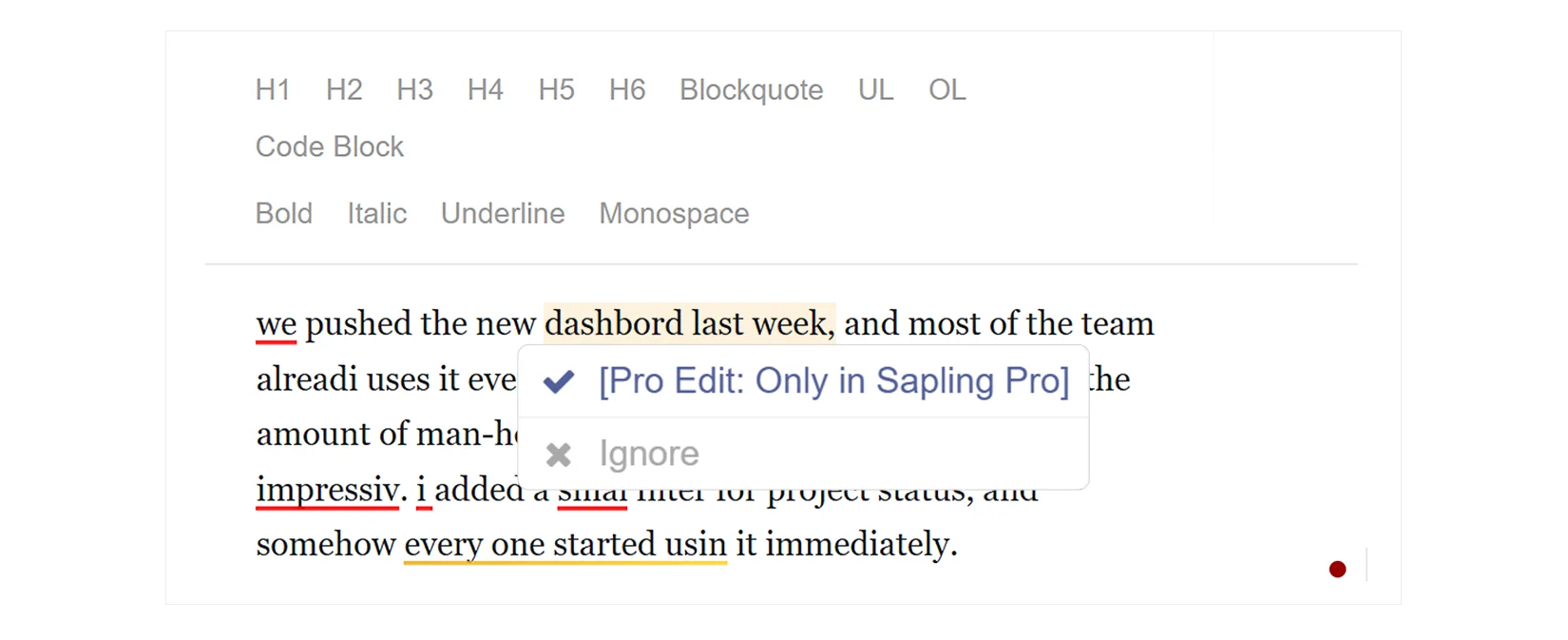
Sapling detected 9 out of 16 errors in our test text. It clearly highlighted 7 spelling mistakes, while the remaining issues were marked in yellow. However, viewing the suggested corrections for these errors requires a Sapling Pro plan. The tool also does not explain why an issue was flagged, which can make some mistakes harder to understand and fix in more complex cases.
WProofreader
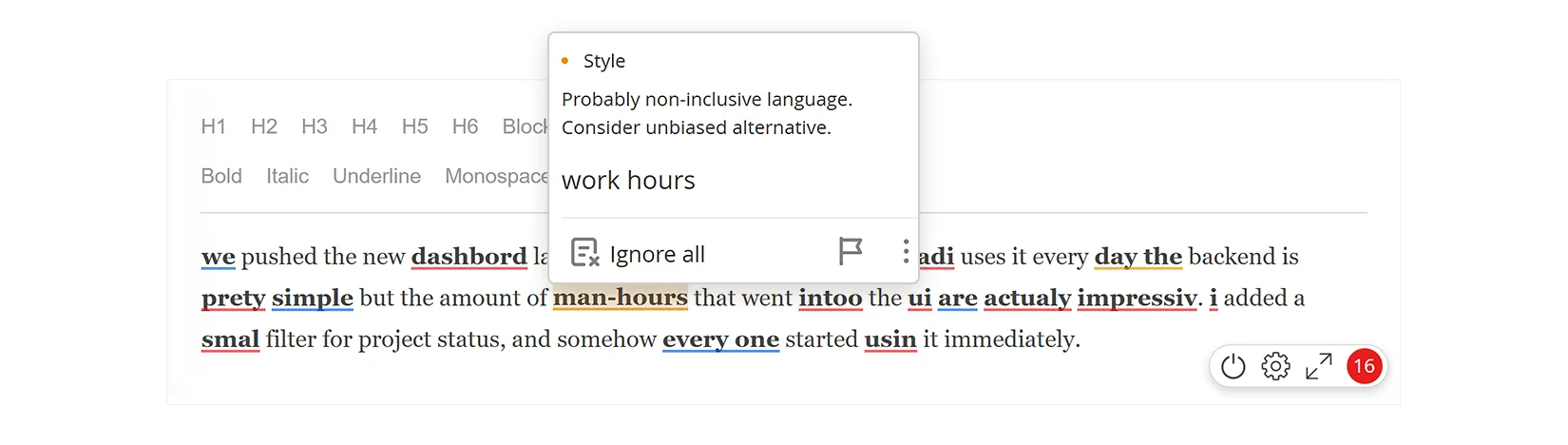
WProofreader caught all the errors in our Draft.js test text.
It also uses different underline colors to mark spelling, grammar, and style issues. This helps users quickly see what kind of mistake they need to fix while editing.
Want to know how these colors work? Read our article Behind colorful lines: how digital proofreaders classify writing errors.
WProofreader also displays correction suggestions when users hover over an error. They can see the type of issue, a short explanation, and suggested corrections without leaving the editor or opening additional menus.
Summary
- Draft.js gives developers control over how their rich text editor works, but adding spell checking requires a separate solution. Its state-based architecture also makes it important for a checker to work smoothly with the editor’s content and rendering.
- Teams can add spell checking through native browser tools, extensions, APIs or dedicated SDKs. Each approach has its own limitations, from basic spelling checks to extra development work needed to keep error highlighting and editing behavior stable.
- WProofreader offers a comprehensive way to add spelling and grammar checking to Draft.js applications. It can work with existing editor setups without major architectural changes and supports real-time checking in multiple languages. The SDK is available for both cloud and self-hosted deployments, giving teams more control over data handling and infrastructure. AI-powered writing assistance can also help users improve their text directly within the editor.
Want to see how WProofreader works with Draft.js? Contact us to discuss the best integration approach for your project.

 Tech
Tech News
News