Over 213 million people use Moodle, making it one of the most popular learning management systems out there. Even though the platform leans heavily on text-based work, users notice that its spelling and grammar checking capabilities remain fairly limited.
The reason is simple: starting with Moodle 2.5, the platform relies entirely on the browser’s built-in spell checker instead of providing one of its own.
That approach creates some real headaches for educational organizations. Especially, international programs feel this the hardest, since so many lecturers and students work in English as a second language and need steady language support throughout their courses. It is difficult for Moodle administrators to ensure a consistent user experience for all users, because each browser follows its own rules for spell-checking.
Let’s dig in and break down how spell-checking works in Moodle today, figure out what separates browser tools from dedicated solutions, and see which one fits your needs best.
The state of spell check in Moodle
Since Moodle no longer includes its own spell and grammar checker, the platform mainly relies on external tools. As a result, the writing experience depends on the user’s device, operating system, browser, and the tools installed or integrated into the Moodle environment.
Moodle users typically rely on the following approaches for spell and grammar checking:
| Solution | How it works |
| Browser spellchecker | Uses the spell checker built into the user’s web browser. |
| Browser extensions | Add spell and grammar checking through browser extensions installed by the user. |
| Solutions built into Rich Text Editors | Add proofreading features directly to the text editor used inside Moodle. |
| AI proofreading plugins | Use AI models to analyze spelling, grammar, style, and writing quality while editing text. |
| External LTI services and assessment tools | Connect Moodle to external platforms that provide writing feedback as part of the assessment process. |
| Dedicated Moodle proofreading plugins | Integrate spell and grammar checking directly into Moodle for a consistent writing experience across the platform. |
At first glance, Moodle offers plenty of ways to check spelling and grammar. In reality, every approach comes with tradeoffs. The right option depends on how consistent you need the writing experience to be across users, devices, and browsers.
Browser spellchecker
The browser spellchecker comes with every modern browser, so it doesn’t require any additional setup. However, its behavior depends entirely on the user’s browser, operating system, device, and personal settings. As a result, two students working in the same Moodle course may get completely different writing assistance.
Its functionality also remains fairly basic. Browser spell check focuses on spelling mistakes and usually provides little or no support for grammar, punctuation, writing style, autocomplete, language detection, or other productivity features.
Browser extensions
Browser extensions expand the browser’s built-in capabilities by adding grammar checking, style suggestions, and other writing tools.
However, they still rely on the user’s browser. Every learner or instructor must install, configure, and maintain the extension individually. Different users may run different products or different subscription plans, which often results in inconsistent features and writing suggestions across the same Moodle environment.
Text editor plugins
Some Moodle text editors include their own proofreading features. For example, TinyMCE offers a built-in spell checking module that can work on either the client or the server.
The limitation is straightforward. This functionality only works inside TinyMCE. If your organization switches editors or uses multiple editors across Moodle, you lose that consistency. For organizations planning long-term Moodle deployments, editor-specific solutions can become a maintenance challenge.
If you’d like to learn more about TinyMCE’s built-in capabilities, see our article TinyMCE spell check capabilities vs. WProofreader.
External LTI services and assessment tools
External services help institutions evaluate completed assignments and often become part of the assessment workflow. However, they don’t support proofreading while users write. They also require separate integration, configuration, and, in many cases, additional licensing.
AI proofreading plugins
In recent years, Moodle has introduced plugins that use generative AI to review student writing. For example, MooProof lets students analyze spelling, grammar, punctuation, structure, and writing style before submitting their work. Instead of automatically correcting mistakes, the plugin provides suggestions that help students improve their own writing.
Despite their broad capabilities, AI proofreading plugins still have several limitations.
- They don’t provide real-time proofreading. Users must run the analysis manually after finishing their text.
- They don’t work as dedicated spell checkers. Besides correcting mistakes, AI can rewrite sentences and change the original meaning.
- They may misinterpret industry terminology, technical vocabulary, or proper names.
- Results are not always predictable because generative AI can misunderstand context or suggest inaccurate corrections.
Dedicated Moodle proofreading plugins
Dedicated proofreading plugins focus specifically on spelling and grammar checking inside Moodle. They integrate directly into the platform and deliver the same writing experience across browsers and devices.
In addition to spelling and grammar, these solutions often include real-time proofreading, tone detection, text rewriting, and other productivity features that help users write faster and make fewer mistakes. Administrators can also deploy a single solution across the entire organization instead of relying on the browsers or extensions that individual users choose.
To make the differences easier to understand, let’s compare them among the features that matter most.
| Feature | Browser | Dedicated Moodle plugins | Extensions | AI plugins | Editor plugins | External LTI services & assessment tools |
| Real-time checking | ✅ | ✅ | ✅ | ❌ | ✅ | ❌ |
| Grammar | Limited | ✅ | ✅ | ✅ | Limited | ✅ |
| Style | ❌ | ✅ | ✅ | Limited | Limited | Depends |
| Extra features | ❌ | ✅ | ✅ | Depends | Limited | ✅ |
| Works the same for all users | ❌ | ✅ | ❌ | ✅ | Only inside one editor | Depends |
| Browser-independent | ❌ | ✅ | ❌ | ✅ | ✅ | ❌ |
| Multi-language support | Limited | ✅ | ✅ | Depends | Limited | ✅ |
| Centralized deployment | ❌ | ✅ | ❌ | ✅ | ✅ | ❌ |
It’s time to move from theory to practice. Below, we’ll check the same sentence using each of the solutions we’ve discussed and see what errors they detect.
Why spell check is vital for Moodle users
We’ll test the free versions of proofreading tools that can work with Moodle. Each solution will analyze the same sample sentence containing 11 intentionally introduced spelling, grammar, and punctuation mistakes.
In the fotoelectric effect electrons are emited from a metal surface only when incident radiantion has frequency above threshold value. increasign the intensity below this frequesncy doesn;t releases any electrons because each foton still have insufficient energy.
Find out more about the different types of errors that digital spell checkers can handle in our article Behind colorful lines: how digital proofreaders classify writing errors 😉
Google Chrome browser spell check
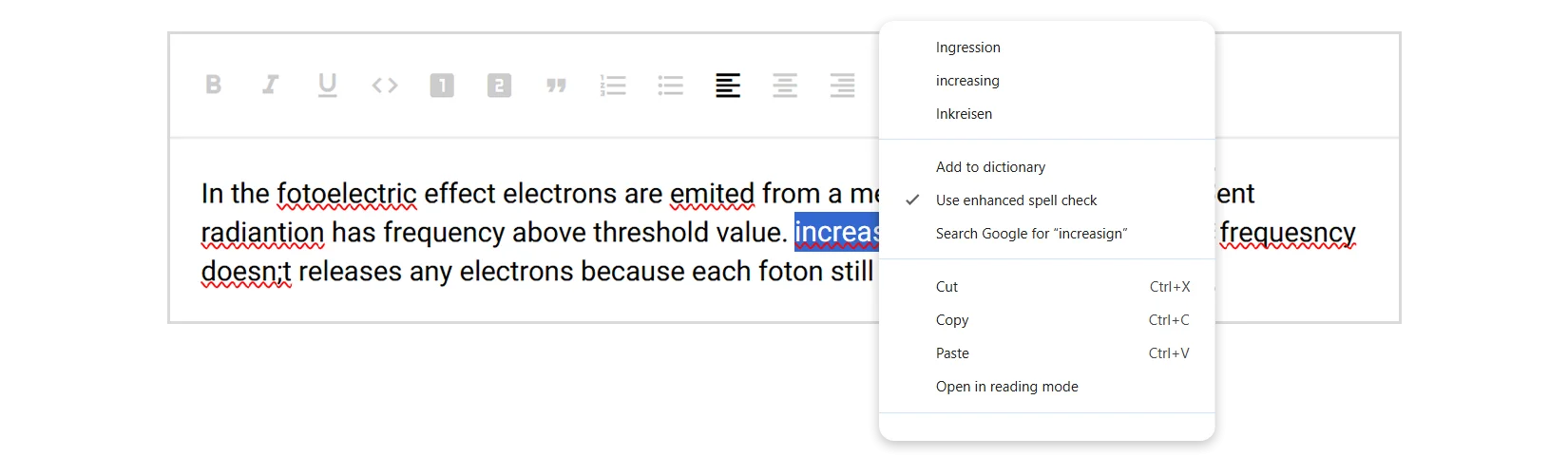
Google Chrome’s built-in spell checker detected 5 out of 11 errors. As expected, it only identified spelling mistakes and ignored grammar and punctuation mistakes. While it works for basic typo detection, its functionality remains fairly limited.
Grammarly
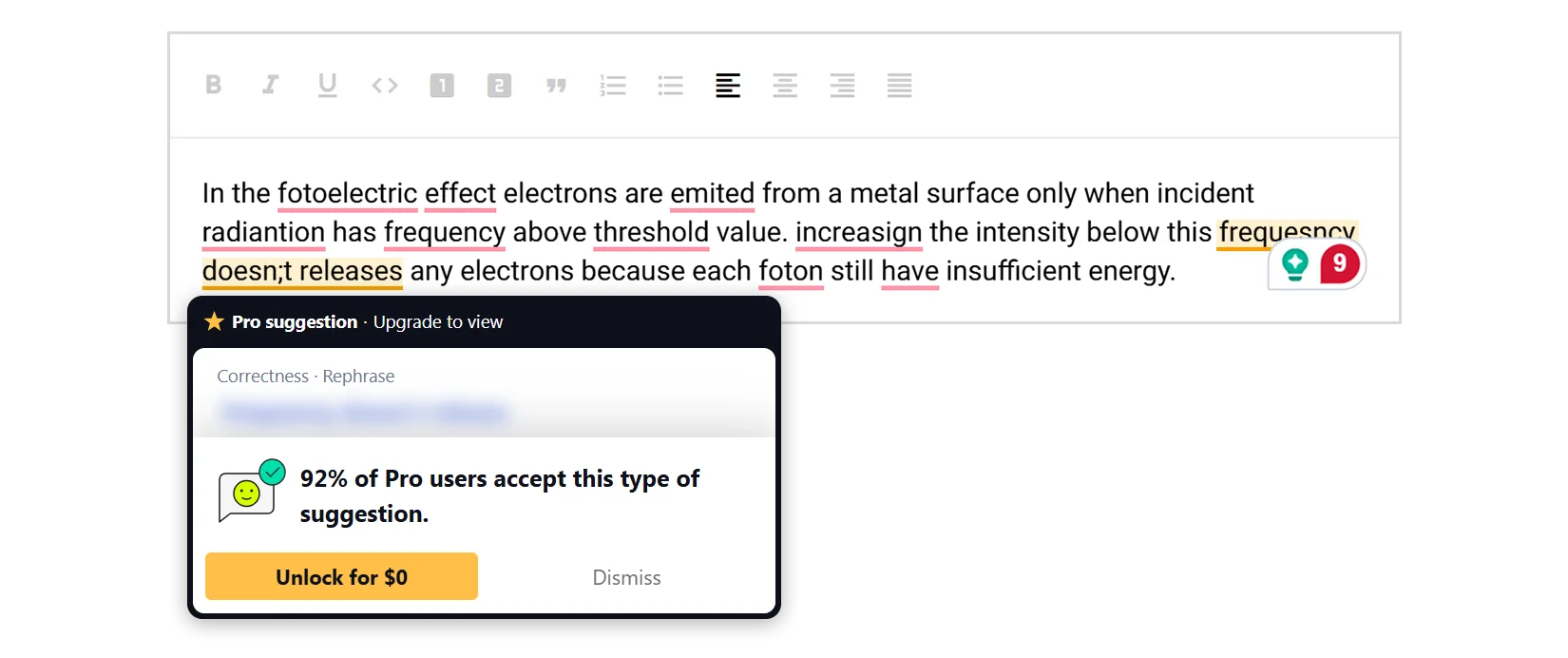
Grammarly detected 9 out of 11 errors, making it one of the strongest performers in our comparison. However, it highlights spelling, grammar and punctuation issues using the same underline style, making it difficult to distinguish between error types at a glance. In addition, some suggestions remain available only with a paid subscription.
TinyMCE’s Spell Checker Pro
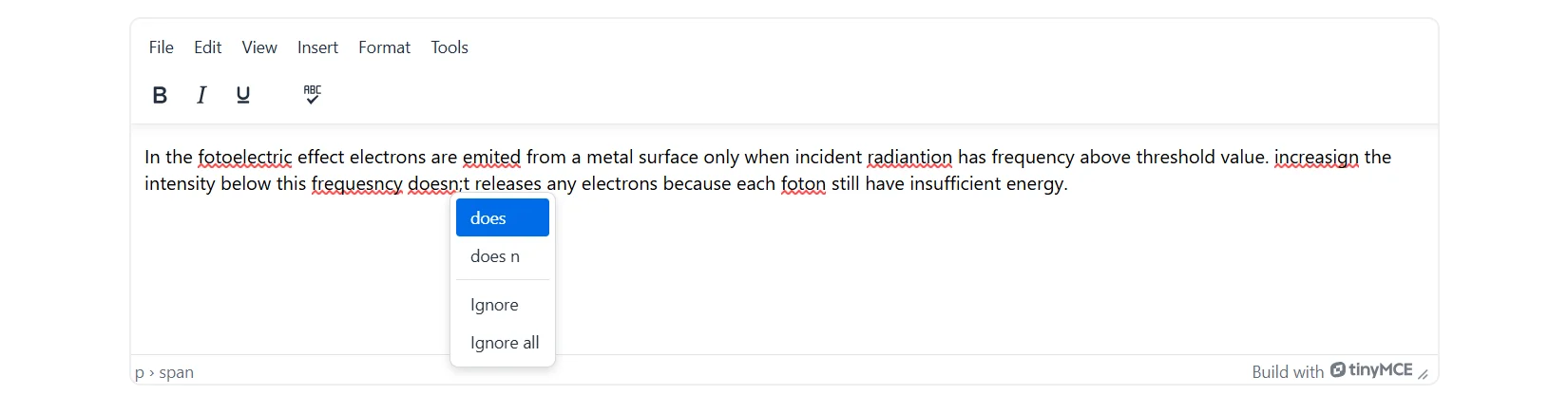
TinyMCE Spell Checker Pro detected 7 out of 11 errors, most of which involved spelling mistakes. During testing, some correction suggestions also proved inaccurate. For example, instead of suggesting doesn’t, the tool offered does n as a correction, which could easily confuse users.
TinyMCE AI assistant
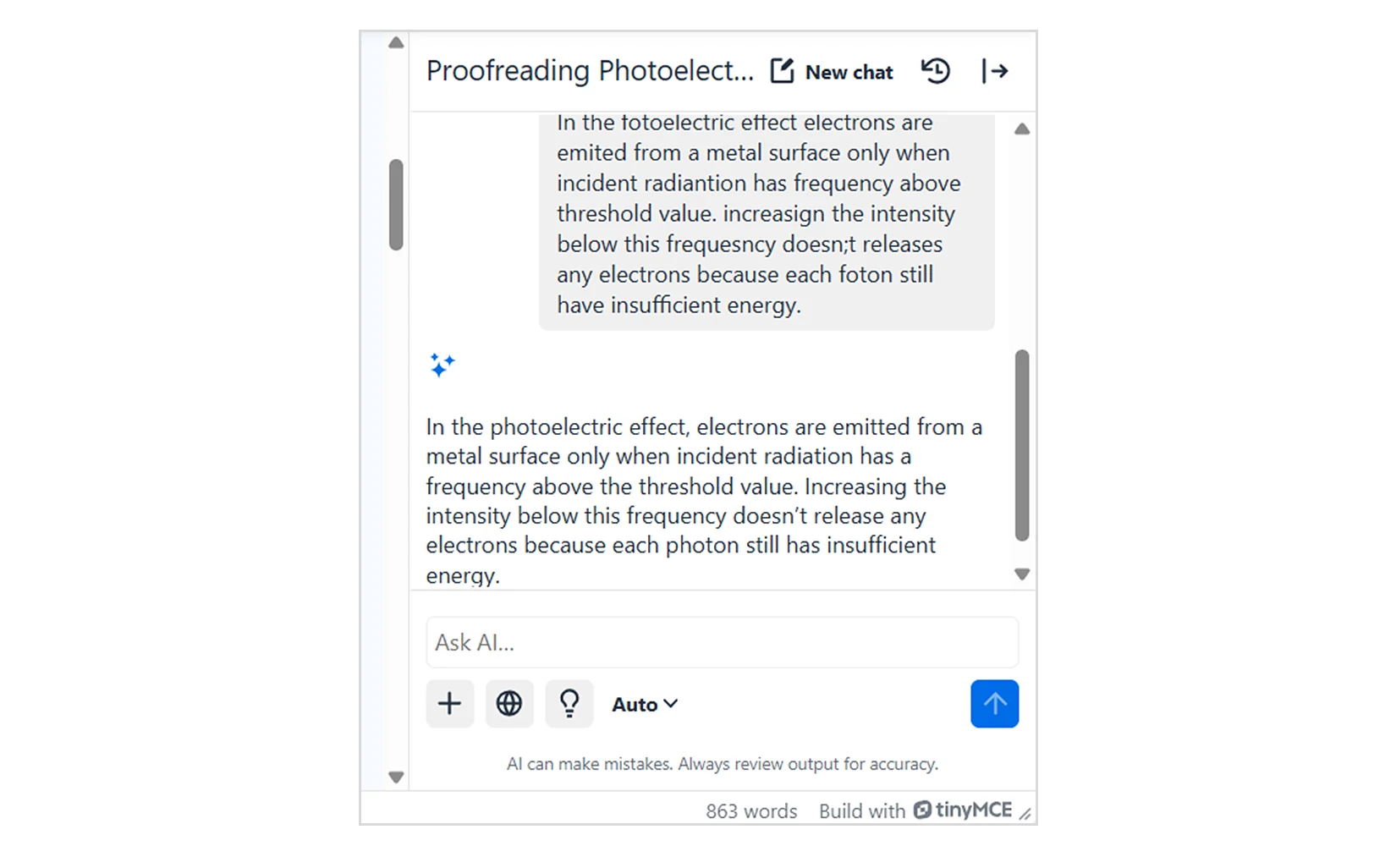
As an AI-powered tool, TinyMCE AI Assistant approached the task differently. Instead of identifying individual mistakes, it simply rewrote the entire sentence. While the final result looked correct, the tool didn’t explain which mistakes it found or let us review individual suggestions before applying them. As a result, users lose control over the editing process and have little visibility into what actually changed.
WProofreader
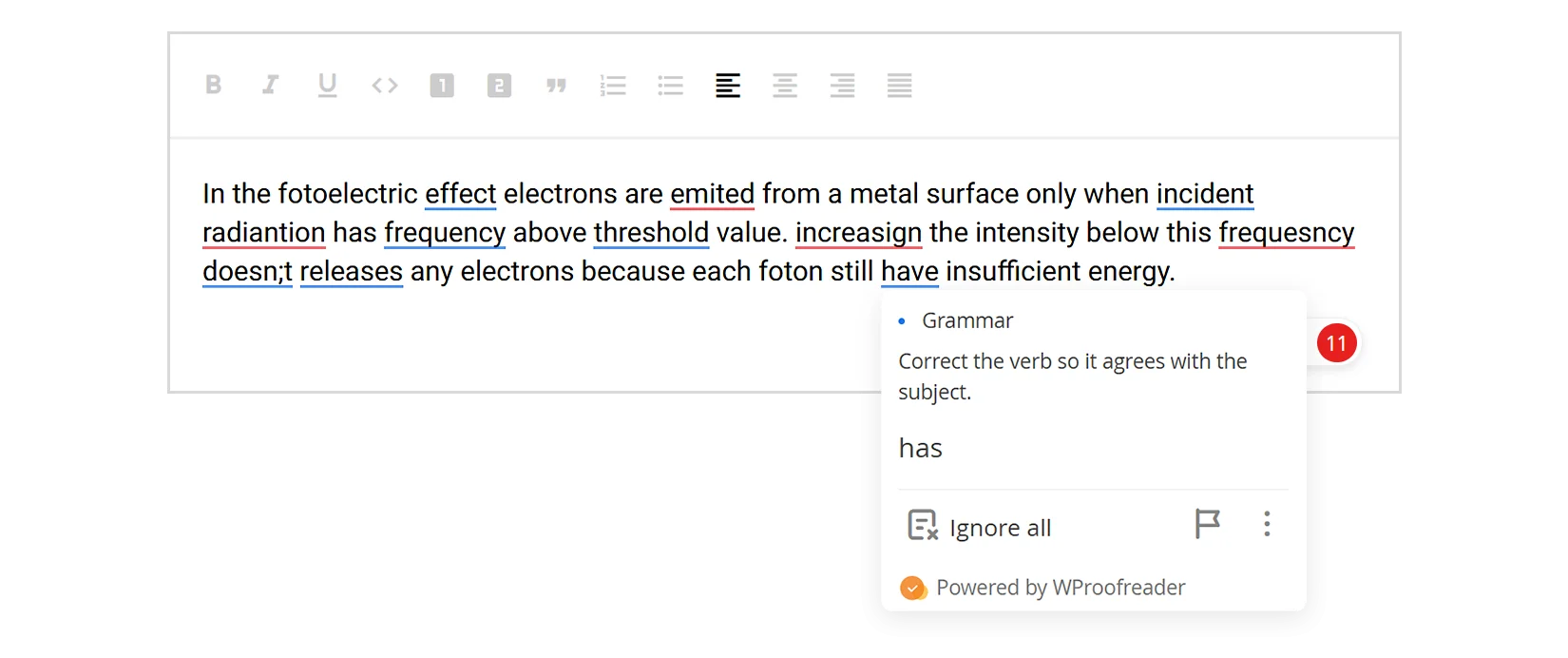
WProofreader is a dedicated spell and grammar checking plugin for Moodle. During our test, it detected all 11 errors in the sample text, including spelling, grammar, and style issues.
To make proofreading easier, WProofreader groups mistakes by category and highlights each type with a different underline color. This helps users quickly understand whether they are looking at a spelling, grammar, or style issue without opening every suggestion.
Every suggestion remains available throughout the editing process, so users can review and apply corrections without interruptions or feature restrictions.
WProofreader: real-time, multilingual spell checker for Moodle
WProofreader is an AI-powered toolkit for real-time spelling and grammar correction in 80+ languages.
The WebSpellChecker team is excited to introduce the first dedicated spelling and grammar checker for Moodle🎓 WProofreader integrates directly into Moodle and gives educators, students, and administrators the same writing experience across browsers and devices.
With Moodle launching its new marketplace for paid plugins on July 20, 2026, WProofreader is now available as a dedicated proofreading solution for Moodle.
💡Try WProofreader for Moodle with a free plan
With WProofreader, you get access to:
- Real-time correction in 20+ languages, including AI-based English, German, and Spanish;
- Autocorrect and autocomplete features;
- Automatic language detection;
- Organization-wide and user custom dictionaries;
- Medical dictionary for English, Spanish, French and German;
- Legal dictionary for English and its dialects;
- Style suggestions for non-inclusive language, profanity, dialect variations, anglicisms and other tone issues.
- Style guide builder with customizable rules for your whole team or organization;
- AI writing assistant 🪄 It is a human-trained paraphrasing and content generation tool. We have put significant effort into creating and testing predefined prompts for various text operations. It helps you take your writing even further: rewrite, paraphrase or summarize in just a few clicks. Available in English, German, Spanish, Portuguese, French, Dutch, Swedish, Danish, Norwegian Bokmål and Italian, Polish and Ukrainian—with more tone and style options coming soon!

WProofreader AI writing assistant
Rewrite and text generation for business and individual users.
Explore moreWProofreader also keeps your data safe. All text is encrypted and stored on secure servers. We follow GDPR and HIPAA standards to make sure your information stays private.
Want to see WProofreader in action before installing? Try it on our on our demos.
You can download the WProofreader plugin for Moodle from the Moodle Marketplace.
Summary
Moodle doesn’t include a built-in spell checker. Instead, it relies on third-party solutions that vary across browsers, devices, or operating systems. For many educational institutions, especially those working with multilingual learners, this creates an inconsistent writing experience and leaves users without the language support they need.
A dedicated proofreading solution helps solve these challenges by providing consistent spell and grammar checking, real-time writing assistance and the same experience for every user across the entire Moodle environment.
If you’re looking for a dedicated proofreading solution for Moodle, try WProofreader.
Explore the online demo, learn more at wproofreader.com, or install the plugin directly from the Moodle Marketplace.

 Tech
Tech News
News